What is the Motherboard Complete Guide for Every User
Published: 11 Feb 2026
Did you know that the motherboard is the central hub of every computer? It connects the CPU, memory, storage devices, graphics cards, and all other components so they can work together. Without it, even the fastest processor or largest memory cannot function properly. Understanding its role helps you build a system that runs efficiently, avoids crashes, and lasts longer.
In this article, we have covered what is the motherboard, including its main components, key functions, types, and tips to choose the right one, is. From distributing power to managing data flow, it plays a critical role in keeping your computer stable and reliable.
Definition of Motherboard
A motherboard is the main circuit board inside a computer that connects all the hardware components. It acts as the central hub where the CPU, memory, storage, and peripheral devices communicate with each other.
Every signal and piece of data passes through the motherboard, making it essential for a computer’s performance. It also provides power and manages how devices interact efficiently.
- The CPU socket holds the processor and connects it to other components.
- RAM slots support memory modules and control total memory.
- The chipset manages data flow between the CPU, memory, and devices.
- Expansion slots allow graphics cards, sound cards, and extra storage.
- Connectivity ports provide USB, audio, network, and video connections.
History of Motherboard
The motherboard has evolved tremendously since the first computers were built. Early designs were simple circuit boards that connected very few components, while modern motherboards are powerful hubs supporting multiple CPUs, high-speed memory, and advanced graphics.
Understanding the history helps you appreciate how these critical components shaped computing and how they continue to improve system performance.
Here is a timeline highlighting the major milestones in motherboard development.
- 1970s – Early Boards: The first motherboards appeared with basic circuitry connecting the CPU and a few memory chips. They were large and used mainly in mainframe computers.
- 1980s – IBM PC Revolution: Standardized boards emerged, allowing compatibility across IBM PCs and clones. Expansion slots like ISA became common for adding peripherals.
- 1990s – ATX Standard Introduced: The ATX form factor became popular, providing better airflow, standardized mounting, and multiple expansion slots for graphics and sound cards.
- 2000s – Integration and Chipsets: Motherboards began integrating graphics, audio, and networking on a single board, reducing the need for additional expansion cards.
- 2010s—High Performance and Gaming: Gaming and workstation boards introduced multiple PCIe slots, advanced cooling solutions, and support for high-speed DDR3/DDR4 memory.
- 2020s – Modern Innovations: Modern motherboards support PCIe 4.0/5.0, M.2 SSDs, multiple CPUs for servers, and improved power delivery for extreme performance.
How Does a Motherboard Work?
A motherboard acts as the central hub that connects all the computer’s components. It allows the CPU, memory, storage devices, and peripherals to communicate with each other seamlessly. By coordinating data flow and power distribution, it ensures your system works efficiently and reliably.
- CPU communication control: The motherboard manages how the processor sends and receives data from memory, storage, and other devices to perform tasks efficiently.
- Memory management: It regulates how RAM interacts with the CPU and stores temporary data for quick access during processing.
- Power distribution: The motherboard supplies the right amount of electricity to all components, preventing overloads and hardware damage.
- Peripheral coordination: USB, audio, video, and network devices connect through the motherboard, which organizes data traffic for smooth operation.
- Expansion integration: Graphics cards, sound cards, and additional storage devices rely on the motherboard to communicate with the CPU and memory effectively.
- Boot and initialization: The motherboard runs BIOS or UEFI firmware that starts the computer, tests hardware, and loads the operating system safely.
Components of a Motherboard
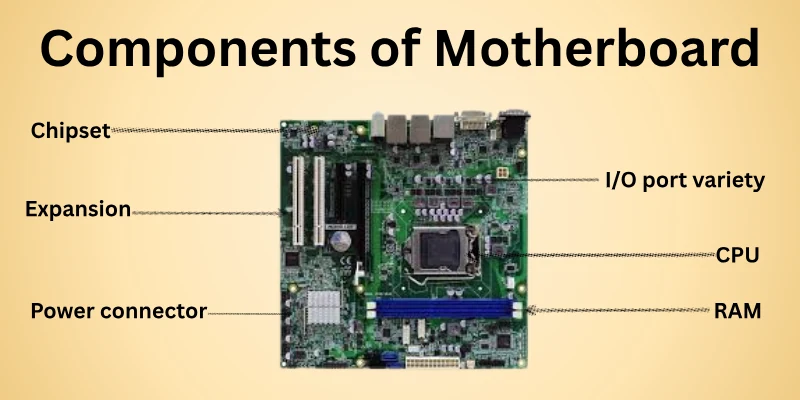
A motherboard has several key components that make your computer function properly. Each part has a unique role, allowing the CPU, memory, storage, and peripherals to work together efficiently. Knowing these components helps you understand how your computer operates and which upgrades may be needed.
Here are the main components of a motherboard and their specific roles:
- CPU socket placement: This is where the processor is installed, providing a secure connection and enabling fast communication with memory and other devices.
- RAM slots capacity: These slots hold memory modules and determine how much temporary data your system can process at once.
- Chipset functions: The chipset controls data flow between the CPU, memory, and connected devices, ensuring smooth operation.
- Expansion slots availability: Slots such as PCIe allow for adding graphics cards, sound cards, or additional storage for improved performance.
- Power connector setup: Motherboards include connectors that distribute electricity safely to all components, protecting hardware from damage.
- I/O port variety: These ports provide connections for USB devices, audio systems, networking, and video output, supporting peripherals effectively.
Types of Motherboards
Motherboards come in different sizes and designs, each suited for specific types of computers and tasks. The type of motherboard you choose affects performance, expansion options, and compatibility with other components.
Knowing the main types helps you select the right motherboard for your system, whether you are building a gaming PC, workstation, or home computer.
Here are the common types of motherboards and what makes each unique:
- ATX standard: The most popular type, offering multiple expansion slots, ample connectivity options, and support for high-performance CPUs and RAM.
- Micro-ATX compact: Smaller than ATX, it provides fewer expansion slots but fits in smaller cases and is often more budget-friendly.
- Mini-ITX small form: Extremely compact and energy-efficient, ideal for small builds, HTPCs, or portable systems with limited space.
- Extended ATX (E-ATX): Larger than ATX, designed for high-end workstations or gaming rigs with multiple graphics cards and maximum memory support.
- Nano-ITX & Pico-ITX: Ultra-small boards used in embedded systems, industrial PCs, or specialized devices requiring minimal size.
- Server motherboards: Built for reliability and scalability, supporting multiple CPUs, large memory capacities, and advanced networking features.
Factors of the Motherboard
A motherboard’s factors describe the key elements that control how it functions and how well it supports other computer parts. These factors help decide system performance, compatibility, and future upgrade options. Choosing the right factors ensures stable operation and better efficiency.
Here are the main factors that influence a motherboard’s performance and usability.
- Form factor size: Defines the physical dimensions of the motherboard and decides which computer case it can fit into comfortably.
- Processor compatibility: Determines which CPU generations and socket types the motherboard can support without issues.
- Memory support: Controls the type, speed, and maximum amount of RAM the system can handle smoothly.
- Expansion slots: Allow users to add graphics cards, sound cards, or network cards to increase system capabilities.
- Storage interfaces: Decide how many HDDs or SSDs can connect and which data transfer speeds are possible.
- Power delivery design: Ensures a stable voltage supply to components, improving performance and system lifespan.
- Connectivity options: Provide ports like USB, HDMI, Ethernet, and audio for easy connection of external devices.
Functions of the Motherboard
The motherboard works as the main platform that holds and connects all computer parts. It allows hardware to communicate smoothly and keeps the system stable during operation. Without it, no component can work together properly.
Here are the main functions of a motherboard.
- Connects components: Links the CPU, RAM, storage devices, and expansion cards so they can work as a single system.
- Manages data flow: Controls how data moves between the processor, memory, and other hardware parts.
- Supplies power: Distributes power from the power supply to each component in the correct amount.
- Supports hardware: Provides sockets and slots to install processors, memory modules, and add-on cards.
- Enables communication: Allows different components to send signals and instructions to each other.
- Controls system startup: Loads firmware that starts the computer and checks hardware before booting.
- Provides external access: Offers ports for USB devices, display output, audio, and network connections.
Pros of Motherboard
A motherboard is essential because it connects and coordinates all parts of a computer. A good motherboard improves system speed, reliability, and efficiency. It allows components to work together seamlessly while supporting future upgrades. Choosing a quality motherboard can significantly enhance overall computer performance.
Here are the main advantages of a motherboard
- Provides stable connections for all internal components.
- Enables smooth data transfer between CPU, memory, and storage.
- Supports multiple expansion cards and additional hardware.
- Offers compatibility with modern peripherals and external devices.
- Improves system reliability and reduces the chances of crashes.
- Allows future upgrades like faster memory and storage.
Cons of Motherboard
Motherboards are vital for a computer, but they have certain drawbacks that users should know. Some models may not meet specific needs or limit system flexibility. Choosing the wrong motherboard can affect performance and cause long-term issues. Being aware of these disadvantages helps in making a smarter purchase.
Here are the main disadvantages of motherboards.
- Limited expansion slots restrict hardware additions.
- Incompatibility with certain CPUs or memory modules.
- Older boards may lack modern connectivity ports.
- High-end models can be costly for basic use.
- Weak cooling designs can lead to overheating.
- Manufacturing defects may cause system instability or failure.
How to Choose the Right Motherboard
Choosing a motherboard needs careful planning because it controls how all computer parts work together. A smart choice improves speed, stability, and upgrade options. I always select motherboards by matching them with real user needs, not trends.
Here are the main points you should check before selecting a motherboard.
- Processor support: Check the socket and chipset to confirm full compatibility with your CPU.
- Board size: Choose ATX, Micro-ATX, or Mini-ITX according to your computer case size.
- Memory limits: Review supported RAM speed, maximum capacity, and available slots.
- Expansion support: Ensure enough PCIe slots exist for graphics cards and add-on hardware.
- Storage options: Prefer boards with M.2 NVMe slots along with SATA ports for flexibility.
- Connectivity features: Look for USB ports, Wi-Fi, Bluetooth, and Ethernet based on daily use.
- Power design: Strong power delivery helps maintain stability during heavy tasks.
Useful Tips
- Always plan future upgrades before buying a motherboard.
- Do not pay extra for features you will never use.
- Check manufacturer support for BIOS updates.
- Match the motherboard with your power supply quality.
- Read real user reviews before making a final decision
Common Motherboard Problems
Motherboard problems can stop a computer from working properly or cause random system failures. Many users face these issues without knowing the real reason behind them. I have fixed these problems many times during system builds and repairs.
Here are the most common motherboard problems users often face.
- No power response: The system shows no lights or fan movement due to faulty power circuits or damaged connectors.
- Boot failure issues: The computer turns on but does not load the operating system because of BIOS or chipset errors.
- Overheating problems: Poor heat control on the board can cause sudden shutdowns and long-term hardware damage.
- RAM detection errors: The motherboard fails to recognize memory modules because of slot damage or compatibility issues.
- Peripheral ports failure: USB, audio, or network ports stop working due to internal circuit faults.
- Random system crashes: Weak power delivery or unstable components can cause frequent freezing or restarts.
- Physical board damage: Burn marks, swollen capacitors, or cracks can result from power surges or poor handling.
Why Are Motherboards Important?
Motherboards play a central role in every computer, connecting all components so they can work together. They control communication, power delivery, and the overall performance of the system. A reliable motherboard ensures smooth operation and allows future upgrades without compatibility issues. Without a good motherboard, even high-end hardware cannot function properly.
Here are the main reasons motherboards matter.
- Enables communication between different hardware components.
- Controls how data moves across CPU, memory, and storage.
- Provides stable electricity to all connected parts.
- Allows installation of additional cards and storage devices.
- Supports advanced features for gaming and workstation tasks.
- Offers ports for connecting external devices and peripherals
Tips for Maintaining a Motherboard
A motherboard is the heart of your computer, and keeping it in good condition ensures your system runs smoothly. Proper maintenance prevents damage, improves performance, and extends the lifespan of your PC. Simple practices and precautions can save you from costly repairs and hardware issues in the future.
Here are the key tips to maintain a motherboard effectively
- Clean dust regularly: Remove dust from slots, ports, and surfaces to prevent overheating and electrical issues.
- Ensure proper airflow: Use fans and case ventilation to keep temperatures low and components safe.
- Handle with care: Avoid touching circuits and connectors directly to prevent static damage.
- Use a stable power supply: Protect the motherboard from voltage spikes and power surges.
- Check connections frequently: Ensure all cables, RAM, and expansion cards are properly seated.
- Update BIOS and firmware: Keep software up to date to improve compatibility and system stability.
- Avoid moisture and liquids: Keep the motherboard away from humidity or accidental spills to prevent corrosion and short circuits.
Conclusion
In this guide, we have covered what is the motherboard is to help you understand its role and value in a computer system. My personal recommendation is to balance its features with possible limits like compatibility and upgrade scope. You can manage these risks by checking specifications carefully and maintaining the system properly. This approach helps you make a smarter and long-term decision.
Thank you for reading this guide and giving your valuable time. Don’t skip the next part of the FAQs. I hope you will find something more interesting, so don’t miss it. If you miss it, you may lose something new.
FAQS: What is the Motherboard
Let’s go through the key FAQs about motherboards. These answers will help you learn more and resolve common doubts.
The motherboard is the main circuit board that connects all computer components. It allows the CPU, RAM, storage, and peripherals to communicate with each other. Without a motherboard, a computer cannot function. It acts as the backbone of the system.
Different motherboard form factors like ATX, Micro-ATX, and Mini-ITX affect the space available for components. Choosing the right size ensures your case and hardware fit properly. Smaller boards save space but limit expansion options. Always plan your build according to both size and features.
Most motherboards support only one CPU brand due to socket differences. Installing the wrong CPU will prevent the system from working. Always check compatibility with your processor before buying. This ensures smooth operation and avoids wasted money.
Yes, some failures happen suddenly due to power surges or manufacturing defects. Signs like random crashes or boot problems may appear first. Regular maintenance reduces the risk. Using surge protectors and stable power sources can help prevent unexpected failure.
No, only motherboards with M.2 slots or PCIe support can use NVMe SSDs. Older models may not have these slots or may need adapters. NVMe drives are much faster than standard SATA SSDs. Checking your motherboard’s storage support ensures maximum speed and compatibility.
Capacitors store and release energy to stabilize power delivery. High-quality capacitors improve system reliability and prevent crashes. Damaged capacitors can lead to failures or unstable performance. Proper care and good-quality boards help avoid capacitor problems.
Motherboards have built-in sound chips for audio output. High-quality chips provide clearer and richer sound for gaming or music. Integrated audio is convenient but may not match dedicated sound cards. A good motherboard ensures better audio performance for everyday use.
Yes, motherboard network controllers affect LAN and Wi-Fi speeds. Older or budget boards may offer slower connections. Upgrading to a board with modern Ethernet or Wi-Fi improves speed and stability. Reliable connectivity is important for gaming, streaming, and remote work.
Some motherboards include integrated Wi-Fi and Bluetooth modules. Budget boards may lack these features and need external adapters. Built-in connectivity reduces cable clutter. Always check connectivity options based on your needs.
PCIe lanes control the speed and number of expansion devices supported. More lanes allow multiple GPUs or high-speed cards to function efficiently. Limited lanes can create bottlenecks. Choosing a board with enough lanes ensures smooth performance for demanding tasks.



- Be Respectful
- Stay Relevant
- Stay Positive
- True Feedback
- Encourage Discussion
- Avoid Spamming
- No Fake News
- Don't Copy-Paste
- No Personal Attacks
- Be Respectful
- Stay Relevant
- Stay Positive
- True Feedback
- Encourage Discussion
- Avoid Spamming
- No Fake News
- Don't Copy-Paste
- No Personal Attacks
