Types of Computers for Students, Professionals, and Home Use
Published: 1 Feb 2026
Why does one computer feel perfect for work while another struggles with the same tasks? Many users face this confusion because they do not clearly understand the types of computers. I see this problem almost every day when people complain about slow speed, poor performance, or wasted money.
From real experience, I know that every computer type is built for a specific job, and using the wrong one creates frustration. Some systems suit basic tasks, while others handle heavy work with ease.
In this guide, we have covered the main computer categories, explained their real uses, and highlighted where each type performs best. This helps you avoid common mistakes and choose a computer that truly matches your daily needs.
What Are Computer Types?
Computer types refer to the different kinds of computers designed to handle specific tasks. Each type varies in size, power, and purpose. Some computers support basic activities like browsing and typing, while others manage complex work such as data processing and design.
People choose computer types based on their daily needs, work environment, and usage level. Understanding these types helps users select a system that fits their tasks without wasting money or effort.
Types of Computers by Size and Power
Computers differ in size and processing ability. Some are small and simple, while others are large and powerful. Choosing the right type depends on the tasks you need to do every day.
Here are the main types.
- Microcomputers
- Minicomputers
- Mainframe Computers
- Supercomputers
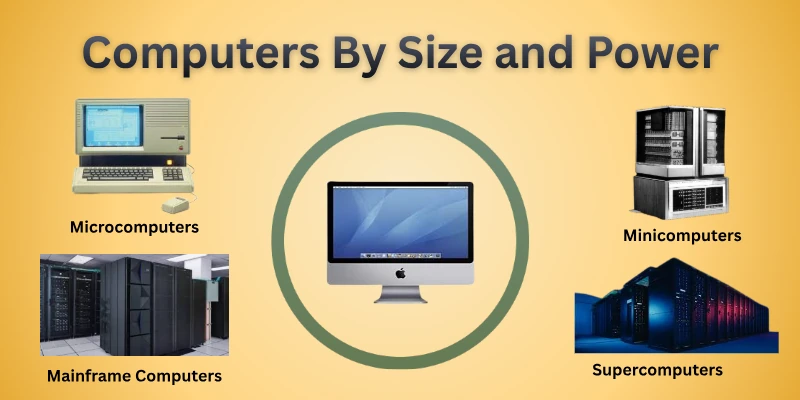
Let’s take a closer look at each type.
1. Microcomputers
Microcomputers are small, personal computers used by individuals for daily tasks. They include desktops, laptops, and tablets. These systems handle common activities like browsing the internet, writing documents, and running simple software. People use them at home, in offices, or for school work. Despite their size, microcomputers are fast, reliable, and easy to operate.
Features
- Compact and lightweight design for easy placement and mobility
- Designed for individual users and personal tasks
- Affordable compared to larger computer systems
- Suitable for office work, education, and entertainment
- Easy to upgrade or expand with additional hardware
2. Minicomputers
Minicomputers are medium-sized computers used by organizations to handle multiple processes at once. They are often used in labs, small industries, and research centers. These systems are faster than personal computers and can run specialized software.
Many businesses choose them when they need reliability and efficiency without the scale of a mainframe. Minicomputers help bridge the gap between small personal systems and large enterprise machines.
Features
- Energy-efficient design compared to larger computers
- Supports networked operations and shared resources
- Can integrate with other devices and control systems
- Offers high storage capacity for structured data
- Suitable for real-time processing and multitasking
3. Mainframe Computers
Mainframe computers are large, powerful systems used by big organizations to process massive amounts of data. They handle thousands of transactions at the same time without slowing down. Banks, airlines, and government offices rely on them for critical operations.
Mainframes provide high security, stability, and continuous performance for essential tasks. These systems are designed to run complex applications and support multiple users simultaneously. Mainframes often serve as the backbone for enterprise networks and large-scale computing.
Features
- Extremely high processing speed for complex calculations
- Can manage very large databases efficiently
- Built for long-term reliability and minimal downtime
- Supports advanced virtualization and multiple operating systems.
4. Supercomputers
Supercomputers are the fastest and most powerful computers in the world. They perform extremely complex calculations in a short time. Scientists and researchers use them for weather forecasting, space exploration, and advanced simulations.
These systems can process huge amounts of data simultaneously, far beyond what mainframes can handle. Supercomputers require specialized cooling and infrastructure to operate efficiently. They are essential for tasks that need massive computation and real-time analysis.
Features
- Can execute trillions of calculations per second
- Uses thousands of processors working together in parallel
- Equipped with specialized high-speed memory for fast data access
- Designed for solving scientific, engineering, and research problems
Types of Computers Based on Usage
Computers are designed to perform different tasks depending on how people use them. Some handle everyday personal work, while others manage business operations or scientific research. Understanding these types helps you choose a computer that fits your needs perfectly.
Here is a list of computer types based on their main usage.
- Personal Computers (PCs)
- Workstation
- Servers
- Embedded Computers
- Gaming Computers
Let’s check out each type individually.
1. Personal Computers (PCs)
Personal computers (PCs) are designed for individual use at home, school, or the office. They handle everyday tasks like browsing the internet, writing documents, and watching videos. People rely on PCs for communication, learning, and entertainment.
These systems are easy to set up and operate without special training. PCs come in various forms, including desktops, laptops, and all-in-one systems. They provide a balance of performance, convenience, and affordability for daily needs.
Features
- Can run a wide range of software applications
- Offer multiple connectivity options, such as USB and Wi-Fi
- Support external devices like printers, scanners, and cameras
- Allow data storage through hard drives or SSDs
- Provide customization options for memory, graphics, and performance.
2. Workstations
Workstations are high-performance computers built for professionals who need extra speed and reliability. Engineers, designers, and video editors often use them for complex projects. These systems can handle large files, run demanding software, and support multitasking efficiently.
Compared to regular personal computers, workstations provide better graphics, faster processing, and more memory. Businesses choose workstations when precision, speed, and stability are critical. They offer a robust platform for tasks that require intensive computing power.
Features
- Equipped with professional-grade graphics cards for detailed rendering
- Support multiple monitors for enhanced productivity
- Offer advanced cooling systems to maintain performance under heavy use
- Can run specialized software for engineering, design, or analysis
- Provide high-speed storage for quick access to large files
3. Servers
Servers are computers designed to provide resources and services to other devices on a network. They help businesses, schools, and websites operate smoothly. Servers run applications, store important information, and allow many users to access data at the same time.
Organizations depend on them to keep operations continuous and efficient. These systems are built to handle heavy workloads and stay reliable under pressure. Servers form the backbone of modern IT infrastructure, supporting both small and large organizations.
Features
- Scalable hardware to expand storage or processing power as needed
- Advanced cooling systems to prevent overheating during constant operation
- High-performance processors for quick task execution
- Redundant power supplies to avoid downtime
- Remote management tools for easy maintenance and monitoring
4. Embedded Computers
Embedded computers are built into machines and devices to control specific functions. You can find them inside appliances, vehicles, and electronic systems used every day. These computers work quietly in the background without direct user interaction.
Their main role is to make devices operate smoothly and automatically. Manufacturers design embedded systems to perform one task very efficiently. Most users never notice them, yet they rely on them constantly.
Features
- Designed to perform a single dedicated function
- Uses low power to support long-term operation
- Operates with minimal memory and storage
- Integrated directly into hardware systems
- Runs specialized software for precise control
5. Gaming Computers
Gaming computers are designed for people who play modern and competitive games. These systems focus on delivering smooth visuals and fast responses during gameplay. Gamers use them to enjoy detailed environments and realistic effects.
Many players prefer them for long sessions without interruptions. Gaming computers also support advanced gaming accessories and setups. They create an immersive experience for casual and professional gamers alike.
Features
- High-end graphics cards to render complex game scenes
- Solid-state drives for faster game loading times
- Optimized hardware to maintain stable frame rates
- Customizable components to match gaming needs
- Support for advanced peripherals like VR and controllers
Types of Computers Based on Data Handling
Computers handle data in different ways depending on how they process information. Some work with physical signals, while others use numbers or symbols. Understanding these types helps users see how computers interpret and manage data.
Here are the main types based on how computers handle data.
- Analog Computers
- Digital Computers
- Hybrid Computers
Let’s understand each type clearly.
1. Analog Computers
Analog computers process information using continuous physical values. These systems measure changes like speed, pressure, or temperature. Engineers once used them to study real-world behavior in machines and processes.
Unlike modern systems, they do not rely on exact numbers or digital signals. Analog computers work best when data changes smoothly over time. Today, they appear mostly in specialized fields and learning environments.
Features
- Uses electrical or mechanical signals to represent data
- Provides real-time output without delay
- Handles varying inputs smoothly and continuously
- Works well with physical measurements and controls
- Requires manual setup and calibration
2. Digital Computers
Digital computers process information using discrete values, mainly zeros and ones. Most modern devices fall into this category, including laptops, smartphones, and servers. These systems handle data through precise calculations and logical operations.
People rely on digital computers for accuracy, speed, and consistent results. They support a wide range of tasks, from simple typing to complex data analysis. Digital computers form the foundation of today’s technology-driven world.
Features
- Uses binary code to represent and process data
- Delivers highly accurate and repeatable outputs
- Supports large storage for programs and information
- Runs software applications for various purposes
- Allows easy data processing and retrieval
3. Hybrid Computers
Hybrid computers combine the working styles of both analog and digital systems. These machines handle real-world signals while also performing accurate calculations. Hospitals and research centers often use them for monitoring and analysis.
Hybrid systems help convert physical data into usable digital results. They support tasks that need speed as well as precision. This combination makes them useful in complex and time-sensitive environments.
Features
- Integrates analog input with digital processing
- Converts continuous signals into numeric form
- Delivers faster response for critical operations
- Supports advanced monitoring systems
- Used in medical and scientific applications
Modern and Specialized Computer Types
Modern technology has introduced computers designed for specific tasks and advanced use. These systems focus on speed, intelligence, or automation to solve complex problems. They play an important role in today’s digital world.
Here’s a quick overview of modern and specialized computer types.
- Artificial Intelligence Computers
- Quantum Computers
- Cloud Computers
- Wearable Computers
- Edge Computers
Let’s explore each type one by one.
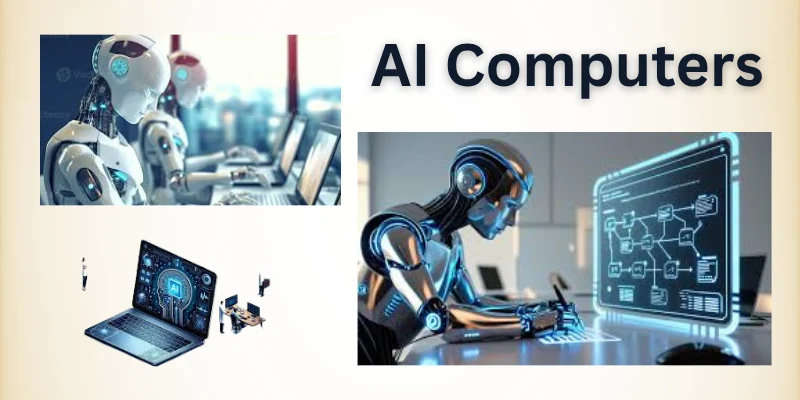
1. Artificial Intelligence Computers
Artificial intelligence computers are built to perform tasks that usually require human thinking. These systems can learn from data and improve their results over time. Many industries use them to analyze information and make decisions faster.
AI computers help automate processes that once needed manual effort. Companies rely on them for accuracy, efficiency, and smart predictions. Their role continues to grow as technology advances.
Features
- Uses machine learning models to recognize patterns
- Processes large datasets at high speed
- Adapts behavior based on new inputs
- Supports automation in complex systems
- Improves decision-making through predictive analysis
2. Quantum Computers
Quantum computers solve problems that are too complex for traditional systems. They use the rules of quantum physics to process information in a new way. These machines perform calculations by working with probabilities rather than fixed values.
Researchers use them to explore advanced science and cryptography. Quantum computers can test many solutions simultaneously. Their development opens new paths for future technology.
Features
- Works with qubits that hold multiple states at once
- Performs parallel computations at extreme speed
- Handles complex simulations more efficiently
- Improves accuracy in scientific research tasks
- Supports breakthroughs in encryption and security systems
3. Cloud Computers
Cloud computers operate using powerful remote systems managed by service providers. People connect to these systems through a web browser or app. This setup removes the need to install heavy programs on personal devices.
Schools, startups, and large companies all depend on cloud platforms for speed and reliability. Updates happen automatically without user effort. Cloud computers also support modern digital workflows smoothly.
Features
- Ensures strong data backup and recovery during system failures
- Allows quick deployment of applications without manual setup
- Supports multiple users working on the same project securely
- Delivers consistent performance across different devices
4. Wearable Computers
Wearable computers are small digital devices designed to be worn on the body. These devices work while people walk, exercise, or perform daily tasks. Many users rely on them to stay connected without holding a phone or laptop.
Sensors inside these systems collect useful real-time data. The fitness, healthcare, and communication industries widely use wearable technology today. Their compact design makes technology more personal and accessible.
Features
- Tracks physical activity such as steps, heart rate, and sleep patterns
- Responds to voice commands for hands-free operation
- Sends instant alerts for messages, calls, and reminders
- Uses low-power hardware to extend battery life
- Integrates smoothly with smartphones and online services
5. Edge Computers
Edge computers process data close to where it is created instead of sending everything to distant servers. This approach helps systems react faster to real-world events. Many industries use edge computing to handle large data flows from sensors and devices. It also reduces internet traffic and delays. Businesses prefer this model when speed and reliability matter most. Edge computers support smart environments and connected systems.
Features
- Analyzes data locally to deliver instant results
- Continues working even during network interruptions
- Improves data privacy by limiting cloud transfer
- Supports real-time applications like smart cameras and factories
- Reduces bandwidth usage and operating costs
Why Computer Types Matter
Understanding different computer types helps people choose the right system for their real needs. Each category serves a specific purpose, from daily tasks to complex problem-solving. When you know these differences, you avoid wasting money and time on unsuitable machines.
This knowledge also improves learning, planning, and decision-making in both study and work. Overall, it builds a clearer picture of how technology fits into everyday life.
- Targeted software support: Ensures users can run programs optimized for specific computer types.
- Hardware compatibility: Allows smooth integration of peripherals and accessories without conflicts.
- Energy efficiency planning: Helps select systems that save electricity and reduce operational costs.
- Security customization: Provides options to implement protections based on computer usage.
- Network optimization: Improves connectivity performance for servers, cloud, or collaborative systems.
- Maintenance simplicity: Reduces downtime by choosing computers suited for predictable workloads.
- Upgrade potential: Ensures future enhancements can be added without replacing the whole system.
Conclusion
In this guide, we have covered the types of computers. I recommend starting with the computers that suit your daily tasks or learning goals and gradually exploring advanced and specialized systems as you grow. Choosing the right type makes your work easier, learning faster, and technology more helpful.
Thank you for reading carefully, and I hope this guide has given you useful insights to make better decisions. Don’t skip the next part of the FAQs. I hope you will find something more interesting, so don’t miss it. If you miss it, you may lose something new.
FAQS:
Let’s go through some FAQs about types of computers, with each answer made easy to understand.
For home use, personal computers or laptops are the best options. They are affordable, easy to use, and handle daily tasks like browsing, office work, and media. Choosing the right PC can make learning, entertainment, and online work easier.
Hybrid computers combine analog and digital technologies to provide both continuous and precise digital outputs. They are commonly used in hospitals for monitoring and in research labs for simulations. These systems help perform tasks that require speed and accuracy together.
Choosing the right computer depends on your tasks, budget, and technical requirements. Beginners usually start with a personal computer or laptop, while professionals may need workstations or servers. Understanding the types helps make smarter and more cost-effective decisions.
Edge computers process data near where it is generated instead of sending everything to the cloud. This reduces delays and improves speed for applications like smart factories and IoT devices. Businesses use them to improve efficiency and lower network costs.
Gaming computers are high-performance systems designed for smooth, realistic gameplay. They have powerful graphics cards, fast processors, and advanced cooling systems. Gamers choose them for immersive experiences and competitive play.
Embedded computers and modern laptops are usually energy efficient. They use low-power processors and optimized software to save electricity. Choosing energy-efficient systems can reduce costs and environmental impact. Selecting devices with energy-saving modes can further extend battery life and lower power consumption.
Most modern computers, including desktops, laptops, and cloud computers, support internet access. Some specialized systems, like embedded computers, may not need the internet. Internet-ready computers allow browsing, online learning, and remote work. Using these systems responsibly with updated software ensures safe and smooth online activity.
Desktop personal computers and workstations are generally easiest to upgrade. Components like RAM, storage, or graphics cards can be replaced easily. Laptops and embedded systems are harder to modify. Planning upgrades in advance helps users save time and ensures compatibility with future hardware.
Most modern computers have error detection and recovery systems. Servers and cloud computers often back up data automatically. Embedded systems may use simple fail-safes to prevent failures. Regular maintenance and software updates also help prevent unexpected errors and keep systems running smoothly.
Yes, security requirements vary by type. Servers, cloud computers, and AI systems need strong firewalls and encryption. Personal and embedded computers may use simpler protections based on usage. It is always important to update software regularly to keep all systems safe from threats.

- Be Respectful
- Stay Relevant
- Stay Positive
- True Feedback
- Encourage Discussion
- Avoid Spamming
- No Fake News
- Don't Copy-Paste
- No Personal Attacks
- Be Respectful
- Stay Relevant
- Stay Positive
- True Feedback
- Encourage Discussion
- Avoid Spamming
- No Fake News
- Don't Copy-Paste
- No Personal Attacks
