Types of Computer Keyboards Upgrade Typing Comfort Instantly
Published: 16 Mar 2026
Why does typing feel smooth on one keyboard but frustrating on another? Many people notice this difference when they switch computers or start using a new device, yet they rarely think about the reason behind it. In most cases, the answer connects to the types of computer keyboards used in different systems.
Each keyboard follows a unique design that affects key response, typing comfort, and overall efficiency. Some keyboards support fast typing, while others focus on comfort during long hours of work.
In this article, we have covered the main keyboard designs and explained how each one can influence the way people type and work on a computer.
So, guys, without wasting time, let’s explore the different types of computer keyboards.
Types of Computer keyboards Step-by-Step
Many people use a keyboard every day, yet they rarely think about how many different designs exist. Each keyboard follows a unique purpose, which means the experience can change depending on the model you use. Understanding these options can help you choose the one that fits your work and typing style.
Here is the list of all types of computer keyboards.
- Mechanical Keyboard
- Membrane Keyboard
- Wireless Keyboard
- Ergonomic Keyboard
- Gaming Keyboard
- Virtual Keyboard
- Flexible Keyboard
- Chiclet Keyboard
- Multimedia Keyboard
- Projection Keyboard
- Bluetooth Keyboard
- Backlit Keyboard
- Laptop Keyboard
- Split Keyboard
- Optical Keyboard
1. Mechanical Keyboard
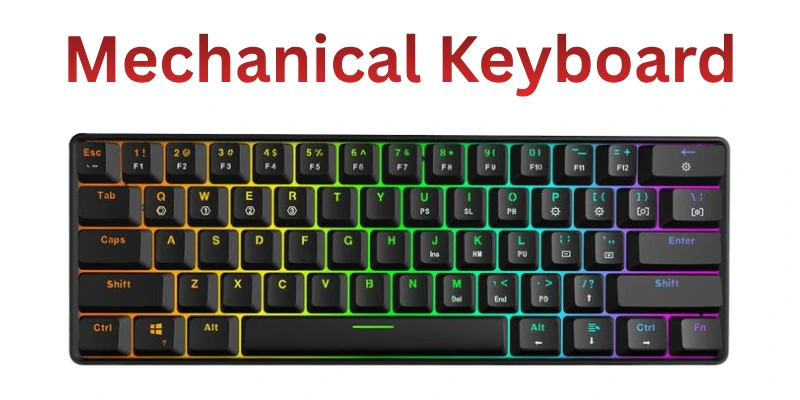
A mechanical keyboard uses a special switch under every key. When you press a key, the switch sends the command to the computer quickly. Many users enjoy the clear feedback while typing. This design helps improve typing speed and accuracy. Writers, programmers, and gamers often prefer this keyboard. Its strong build also supports long-term daily use.
- Individual switches under every key
- Strong feedback during every key press
- Popular choice for gamers and writers
- Durable design for long typing sessions
2. Membrane Keyboard
A membrane keyboard follows a simple and quiet design. Instead of individual switches, it uses a soft membrane layer under the keys. When you press a key, the layer touches the circuit and sends the signal. Many offices use this keyboard because it produces very little noise. It also feels soft while typing for long periods. This keyboard type often appears in many standard computer setups.
- Soft membrane layer under keys
- Quiet typing for office environments
- Lightweight and simple keyboard structure
- A common keyboard in many computers
3. Wireless Keyboard
A wireless keyboard connects to a computer without a cable. It uses Bluetooth or a small USB receiver to communicate with the device. This design keeps the workspace clean and organized. Many people choose it to reduce desk clutter. It also allows flexible placement while working. Users can type comfortably from different positions.
- No cable between keyboard and computer
- Connects using Bluetooth or USB receiver
- Keeps desk clean and organized
- Flexible typing position and movement
4. Ergonomic Keyboard
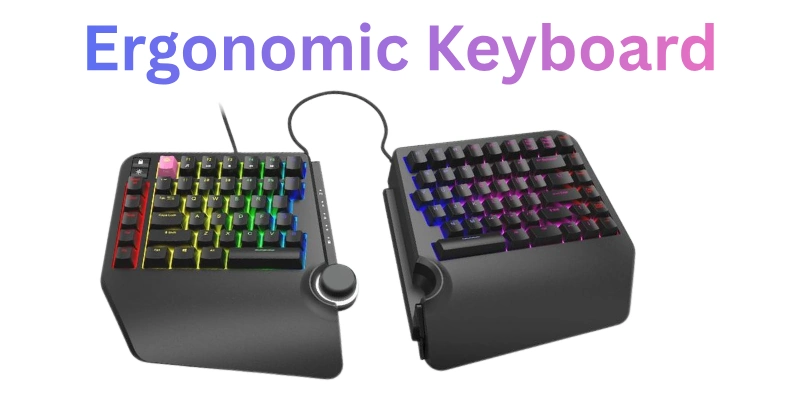
Typing for long hours can strain your hands and wrists if the keyboard design is not suitable. An ergonomic keyboard is built to reduce discomfort and prevent injuries. Its keys are often split or curved to match the natural position of your fingers.
Many professionals who type daily, such as writers or data entry workers, prefer this keyboard. Ergonomic keyboards improve posture and can reduce tension in the shoulders and arms. They often include wrist rests for extra support. Choosing the right ergonomic model can make long work sessions more comfortable and productive.
- Curved keys match natural finger positions
- Reduces strain on wrists and arms
- It includes a wrist rest for extra comfort
- Helps maintain better posture while typing
5. Gaming Keyboard
Gamers need fast and accurate input, and a gaming keyboard delivers exactly that. It usually includes mechanical switches for quick key registration. Many models have extra programmable keys to perform complex actions instantly.
Some keyboards also feature customizable backlighting to improve visibility during long gaming sessions. Gaming keyboards often come with strong build quality to withstand heavy usage. They allow players to maintain high speed and precision without fatigue. Choosing the right gaming keyboard can give a clear advantage in competitive play.
- Fast response for high-speed gaming
- Mechanical switches improve key accuracy
- Extra keys for custom actions
- Durable design for intense usage
6. Virtual Keyboard
A virtual keyboard appears on a screen and allows typing without physical keys. Many people use it on tablets, smartphones, or touchscreen laptops. It is portable and does not require any extra hardware. Some virtual keyboards include predictive text and swipe typing for faster input.
They are helpful in situations where carrying a physical keyboard is not practical. Virtual keyboards also adapt to different screen sizes and layouts. Using a virtual keyboard can make typing convenient on the go.
- Displayed on the screen for typing
- Works on smartphones and tablets
- Supports swipe and predictive typing
- Portable alternative to physical keyboards
7. Flexible Keyboard
A flexible keyboard is made from soft, bendable materials that allow it to roll or fold for easy portability. It is lightweight and can be carried in a bag without taking up much space. Many travelers or mobile workers prefer this type because it fits anywhere.
The keys work like a regular keyboard, but the surface can bend without damaging the circuits. Flexible keyboards are also quiet while typing, making them ideal for public or shared spaces. Some models are waterproof, which adds protection against accidental spills. Using a flexible keyboard gives convenience without compromising functionality.
- Made from soft, bendable materials
- Easy to carry in small bags
- Quiet typing suitable for public spaces
- Some models resist water and spills
8. Chiclet Keyboard
A chiclet keyboard has flat, square keys with rounded edges and gaps between them. It provides a clean and modern appearance, often seen in laptops and slim computers. The design makes typing lighter and reduces finger fatigue over long periods.
Many users enjoy the smooth and quiet keystrokes it offers. Chiclet keyboards are also easy to clean because dust does not get trapped between keys easily. Their slim profile fits well on compact desks or workstations. For everyday typing tasks, a chiclet keyboard provides comfort and efficiency.
- Flat keys with rounded edges
- Keys spaced to reduce typing errors
- Slim and compact modern design
- Easy to clean and maintain
9. Multimedia Keyboard
A multimedia keyboard includes extra keys to control media like volume, play, pause, and shortcuts. Many office workers and home users prefer it for quick access to music or video controls. These keyboards can improve productivity by allowing fast actions without using the mouse. Some models also offer customizable keys for launching applications instantly.
Multimedia keyboards often combine standard typing with enhanced functionality. They are especially useful for people who multitask frequently. Using one reduces interruptions while working or enjoying media content.
- Extra keys for media control
- Quick access to common shortcuts
- Combine typing with added functions
- Useful for multitasking efficiently
10. Projection Keyboard
A projection keyboard projects a virtual keyboard onto any flat surface using laser or LED technology. Users can type by touching the projected keys, and the sensors detect the input accurately. This keyboard type is lightweight and ultra-portable, perfect for people who work on the go. Many tech enthusiasts use it for tablets, smartphones, or small laptops.
It saves space because no physical keys are needed. Projection keyboards are often compatible with multiple devices, which adds to their flexibility. Using one provides a futuristic typing experience without carrying a bulky device.
- Projects keyboard onto a flat surface
- Detects touch using sensors
- Ultra-portable and lightweight design
- Compatible with multiple devices
11. Bluetooth Keyboard
A Bluetooth keyboard connects wirelessly to computers, tablets, and smartphones. It eliminates the need for messy cables and provides a cleaner workspace. Many people prefer it for flexible placement and typing from a distance.
Modern models support multiple device pairing, allowing users to switch easily between devices. Battery life is usually long, and some keyboards offer rechargeable options. Bluetooth keyboards are ideal for mobile workers and home offices. Choosing one improves comfort and efficiency while keeping the desk clutter-free.
- Connects wirelessly via Bluetooth
- Supports multiple device pairing
- Long battery or rechargeable options
- Ideal for flexible typing positions
12. Backlit Keyboard
A backlit keyboard includes lights under the keys to improve visibility in low-light conditions. Many gamers, night workers, and students prefer this feature for comfortable typing. The lights often come in adjustable brightness or different colors for style and convenience.
Some keyboards allow individual key customization for better control during games or work. Backlit keyboards enhance the overall typing experience, making it easier to see every key. They are especially helpful in dark environments or during travel. Using one ensures accurate and smooth typing anytime.
- Keys are illuminated for low light.
- Adjustable brightness or colors
- Supports key customization options
- Helps with accurate typing in the dark
13. Laptop Keyboard
A laptop keyboard is built directly into a laptop’s body. It allows users to type without connecting to any external device. The keys are usually thinner and closer together compared to desktop keyboards. This compact design helps laptops stay lightweight and portable.
Many people rely on laptop keyboards for daily tasks such as writing, browsing, and office work. The layout often includes special function keys for brightness, volume, and system control. Because of its built-in design, the laptop keyboard makes mobile computing simple and convenient.
- Built directly inside the laptop body
- A compact layout saves device space
- Thin keys for lightweight typing
- Includes useful laptop function keys
- Ideal for portable daily computing
14. Split Keyboard
A split keyboard divides the key layout into two separate sections. This design allows users to place their hands in a more natural position while typing. Many professionals choose this keyboard to reduce wrist and shoulder tension.
The separated layout encourages better posture during long typing sessions. Some models allow users to adjust the distance between both sides. This flexibility helps create a comfortable typing setup. People who spend many hours on a computer often appreciate the ergonomic benefits of this keyboard.
- The keyboard is divided into two sections
- Encourages natural hand positioning
- Reduces wrist and shoulder strain
- Adjustable spacing between both sides
- Supports comfortable long typing sessions
15. Optical Keyboard
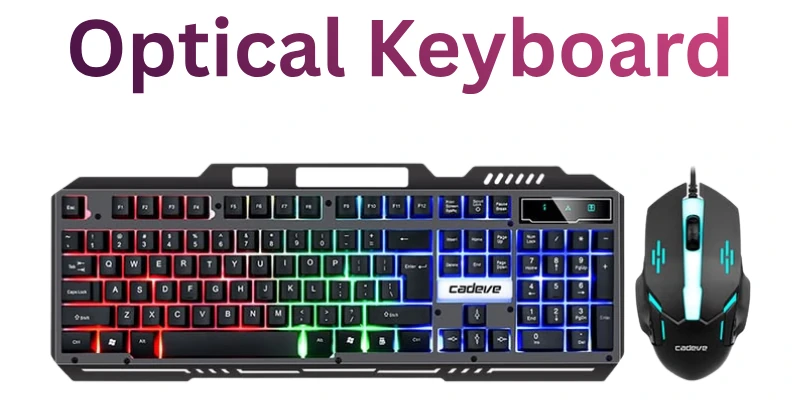
An optical keyboard uses light-based technology instead of traditional mechanical contacts. When a key is pressed, the system detects the action through light interruption. This modern design reduces physical wear inside the keyboard.
Many optical keyboards respond very quickly during typing or gaming. The absence of traditional contact points also increases durability. Some models include advanced lighting features that improve visibility. Optical keyboards combine modern technology with reliable typing performance.
- Uses light sensors for input detection
- Very fast response during typing
- Reduces internal mechanical wear
- Durable design for long-term usage
- Often includes advanced lighting effects
How to Choose the Right Computer Keyboard
Choosing the right keyboard can improve both comfort and productivity. Many people select a keyboard without thinking about their daily typing needs. However, the right option depends on your work style, device compatibility, and personal preference. When you focus on the right features, you can find a keyboard that supports smooth and efficient typing.
- Typing purpose: Identify how you plan to use the keyboard. Writers, office workers, and gamers often need different keyboard features.
- Keyboard type: Explore various keyboard designs before deciding. Mechanical, membrane, and ergonomic models provide different typing experiences.
- Comfort level: Pay attention to how the keyboard feels during long typing sessions. A comfortable layout can reduce hand fatigue.
- Connectivity option: Choose between wired and wireless keyboards depending on your workspace and device requirements.
- Key design: Check the shape, spacing, and feedback of the keys. These factors influence typing speed and accuracy.
- Device compatibility: Ensure the keyboard works well with your computer, tablet, or other devices.
- Build quality: Select a keyboard made with durable materials so it can handle regular daily use.
Final Thought: Types of Computer Keyboards
In this guide, we have covered types of computer keyboards and discussed many keyboard designs that people use in daily life. We explored how different keyboards work and why each type suits a specific purpose. Some keyboards support comfort, some focus on speed, and others help users work more efficiently.
Understanding these options can help you choose the keyboard that matches your typing style and work needs. I truly hope this guide helped you learn something useful and made the topic easier to understand.
Thank you for spending your valuable time reading this guide until the end. Don’t skip the next part of the FAQs. I hope you will find something more interesting, so don’t miss it. If you miss it, you may lose something new.
FAQS: Types of Computer Keyboards
Here are some frequently asked questions about types of computer keyboards that can help you understand this topic more clearly.
The main types of computer keyboards include mechanical, membrane, wireless, ergonomic, and gaming keyboards. Each type has its unique design and typing experience. Choosing the right one depends on your comfort, work style, and purpose. Understanding these types helps you pick a keyboard that suits daily use.
Mechanical keyboards are usually the best for typing speed. They provide tactile feedback and faster key registration. Many writers and programmers prefer mechanical keyboards for accuracy. The type of switch also affects how fast you can type comfortably.
A mechanical keyboard uses individual switches for each key. Pressing a key triggers a physical mechanism, giving precise feedback. Mechanical keyboards are durable and popular among gamers and typists. They often feel more responsive than membrane keyboards.
Gaming keyboards are built for speed and accuracy. They often include mechanical switches, customizable keys, and backlighting. Extra features like macro keys help gamers perform complex commands. Durability and fast response are key advantages.
Flexible keyboards are made of soft silicone and can roll or fold. They are lightweight, portable, and easy to carry. The keys work like a normal keyboard but bend without damage. This makes them ideal for travel or compact spaces.
For office work, ergonomic and membrane keyboards are often the best. They are quiet, comfortable, and affordable. Ergonomic designs reduce strain during long typing sessions. Membrane keyboards offer smooth typing for daily tasks.
Yes, many modern wireless keyboards support low-latency connections. Gaming wireless keyboards reduce lag and respond quickly. They offer freedom of movement and a clean workspace. Look for models with fast switches for the best results.
Consider your typing purpose, comfort, and device compatibility. Look at keyboard type, key design, and connectivity options. Ergonomics, portability, and extra features also matter. Picking the right keyboard improves typing efficiency and overall experience.


- Be Respectful
- Stay Relevant
- Stay Positive
- True Feedback
- Encourage Discussion
- Avoid Spamming
- No Fake News
- Don't Copy-Paste
- No Personal Attacks
- Be Respectful
- Stay Relevant
- Stay Positive
- True Feedback
- Encourage Discussion
- Avoid Spamming
- No Fake News
- Don't Copy-Paste
- No Personal Attacks
