What is the Keyboard Full Guide to Improve Your Keyboard Skills
Published: 12 Mar 2026
Typing slowly, making constant errors, or feeling fatigued after long hours at the computer can be frustrating. The solution starts with understanding what is the keyboard works and how each key, layout, and shortcut works. Once you know its functions, your hands move naturally, your typing speed improves, and repetitive mistakes are reduced significantly.
In this article, we have covered how keyboards work and what to look for when choosing the right one for your needs, whether it’s for gaming, coding, or office work. With this knowledge, your productivity increases, stress decreases, and computer tasks feel smoother than ever before.
So, guys, without wasting time, we will explore what is the keyboard is and why it is so important for your daily computer tasks.
What is the keyboard in a computer?
A keyboard is one of the most important input devices used with a computer. It allows users to type letters, numbers, and different commands easily. People rely on it every day to write documents, send messages, search on the internet, and control many computer programs.
Each key on the keyboard performs a specific action when pressed, which helps the computer understand the user’s instructions. Because of its simple design and fast typing ability, the keyboard remains an essential tool for students, office workers, and anyone who uses a computer regularly.
- Includes letters, numbers, and special keys
- Contains function and navigation keys
- Helps control many computer tasks
- Useful for editing and formatting text
- Works with desktops and laptops
- Available in wired and wireless models
History of the Keyboard
The keyboard started from typewriters long before computers existed. Over time, engineers improved their design for faster and easier typing. When computers became common, keyboards adapted to handle commands and text efficiently. Today, they include extra keys and ergonomic designs for better comfort and productivity.
- 1868: First typewriter invention: Christopher Sholes created a typewriter that shaped modern keyboards.
- 1870s: QWERTY layout design: The QWERTY arrangement improved speed and reduced key jams.
- 1940s: Early computer keyboards: Simple keyboards allowed data entry for early computers.
- 1960s: Electronic keyboard systems: Mechanical parts were replaced with faster electronic circuits.
- 1980s: Personal computer keyboards: Home and office use of keyboards grew rapidly.
- 1990s: Multimedia keyboard keys: Added keys for music, internet, and extra functions.
- 2000s: Wireless keyboard technology: Wireless keyboards used Bluetooth and radio signals.
- Modern era: Ergonomic keyboard designs focus on comfort, speed, and user productivity.
How a Keyboard Works
A keyboard is an essential tool that sends your input to a computer quickly and accurately. When you press a key, it triggers an electrical signal that the computer interprets as a letter, number, or command.
Modern keyboards use advanced circuits to detect each key press and send data almost instantly. Understanding how a keyboard works can help you type more efficiently and avoid common mistakes. This knowledge is especially useful for students, office workers, and anyone who relies on computers daily.
- Electrical signals sent: Each key press generates a signal that the computer recognizes instantly.
- Circuit board detection: The internal circuits detect the exact location of the pressed key.
- Microcontroller processes input: A small processor interprets the signal and converts it to digital code.
- Computer receives data: The system receives the code and displays the corresponding character on the screen.
- Shortcut keys function: Special keys trigger commands or perform tasks quickly within programs.
- Connection methods differ: Keyboards can communicate through wired USB, wireless Bluetooth, or other technologies.
Functions of a Keyboard
A keyboard is one of the most important tools for interacting with a computer. It allows users to type text, enter numbers, and give commands quickly. Keyboards help control software, navigate programs, and perform tasks efficiently.
Understanding the functions of a keyboard can improve typing speed and overall productivity. Everyone, from students to professionals, relies on it daily for work and communication.
- Typing letters and numbers: Converts each key press into characters on the screen.
- Executing commands quickly: Enables shortcuts and special key combinations in programs.
- Navigating through software: Helps move between menus, documents, and web pages efficiently.
- Editing and formatting text: Provides keys to delete, copy, paste, and modify content.
- Controlling media functions: Allows adjustment of volume, playback, and screen brightness.
- Connecting with devices: Works with desktops, laptops, and even wireless systems.
Types of Computer Keyboards
Keyboards come in many types for different needs. Each type has features and designs that make typing easier or faster. Some focus on comfort, others on speed or extra functions. Knowing the types helps you pick the right keyboard for work, gaming, or daily use.
- Standard QWERTY keyboards: Most common type used for general typing and office work.
- Mechanical keyboards: Feature individual switches under each key for tactile feedback and durability
- Membrane keyboards: Use a pressure pad system that makes typing quieter and smoother.
- Ergonomic keyboards: Designed to reduce strain on hands and wrists during long typing sessions.
- Multimedia keyboards: Include extra keys to control music, videos, and internet shortcuts.
- Wireless keyboards: Connect without cables using Bluetooth or radio frequency technology.
Types of Keys on a Keyboard
A keyboard has many types of keys, each serving a specific purpose. Some keys help you type letters and numbers, while others control computer functions. Special keys make tasks like editing, navigating, or running programs easier.
Knowing the types of keys helps you work faster and more efficiently. Every keyboard may have different keys, but most include the same basic functions for daily use.
- Alphanumeric keys: Include letters, numbers, and common symbols for typing text.
- Function keys (F1–F12): Perform specific commands or shortcuts in software programs.
- Control keys: Help manage tasks like copy, paste, undo, or open menus.
- Navigation keys: Include arrow, Home, End, Page Up, and Page Down keys for moving within documents.
- Modifier keys: Shift, Ctrl, and Alt change the function of other keys when pressed together.
- Special keys: Include Enter, Escape, Tab, and spacebar for executing commands or spacing text.
Common Keyboard Layouts Used in Computers
Different keyboard layouts help people type efficiently in various regions and languages. Designers created these layouts to improve typing speed and reduce typing errors. Each layout arranges letters and symbols in a specific pattern.
Many countries prefer certain layouts based on language and typing habits. Learning about common layouts helps users choose the one that suits their needs.
- QWERTY keyboard layout: Most widely used layout found in computers across many countries.
- AZERTY keyboard layout: Common in France and nearby regions for French language typing.
- QWERTZ keyboard layout: Popular in Germany and Central Europe for local language use.
- DVORAK keyboard layout: Designed to improve typing efficiency and finger movement.
- Colemak keyboard layout: Modern layout created to increase comfort and typing speed.
- Multilingual keyboard layouts: Support typing in multiple languages through special characters
Parts of a Keyboard
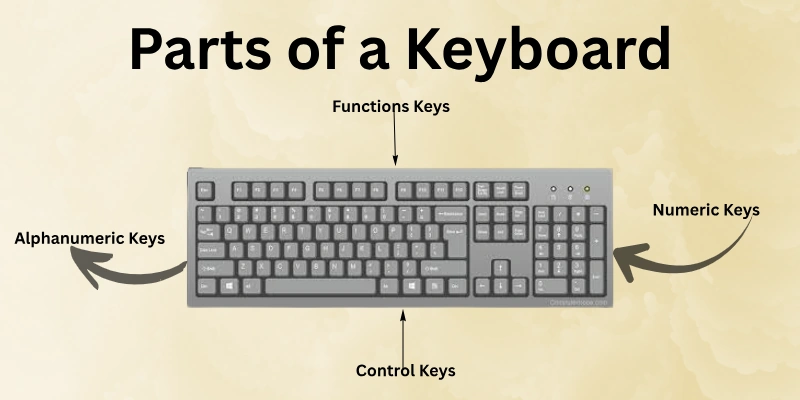
A computer keyboard contains several sections that help users perform different tasks. Each part has a specific role that makes typing and navigation easier.
These sections organize the keys so users can quickly find what they need. A well-structured keyboard allows smooth interaction with the computer. Understanding its parts helps users work faster and more confidently.
- Alphanumeric key section: Main area used for typing letters, numbers, and basic punctuation.
- Function key row: Located at the top and provides quick access to special system commands.
- Numeric keypad area: A separate number pad designed for fast data entry and calculations.
- Navigation key cluster: Includes arrow keys and movement controls for scrolling through content.
- Control key group: Contains keys like Ctrl, Alt, and others for command combinations.
- Indicator light panel: Small lights show the status of keys like Num Lock and Caps Lock.
Uses of a Keyboard
A keyboard is an important device that helps users interact with a computer easily. People use it for many tasks in daily computer work. It allows quick communication with the system through different keys and commands. Many professional and personal activities depend on this device. Learning its uses helps users handle computer tasks more efficiently.
- Writing digital content: Users create documents, reports, and messages by entering text quickly.
- Running shortcut commands: Key combinations help complete tasks faster in many programs.
- Searching online information: Users type queries to find data, websites, and resources.
- Entering numerical data: Useful for calculations, records, and spreadsheet work.
- Controlling game actions: Many computer games rely on keyboard keys for player controls.
- Operating software menus: Users open options and features inside programs through key inputs.
Advantages of Using a Keyboard
A keyboard makes computer work simple and efficient for many users. People rely on it to interact with digital systems every day. It provides a practical way to communicate with software and applications. Many tasks become faster when users understand how to use them properly. Because of its ease of use, the keyboard remains a common tool in modern computing.
- Enables quick and accurate text entry
- Supports efficient command input operations
- Improves productivity in daily tasks
- Offers reliable control for software
- Helps manage various computer functions
- Works well across many devices
Disadvantages of Using a Keyboard
Although a keyboard is very useful, it also has some limitations. Long typing sessions can cause discomfort for some users. Mistakes may happen when users press the wrong keys quickly. In some cases, keyboards may not work well without proper care. Understanding these drawbacks helps users use the device more carefully.
- Causes hand and wrist strain
- Typing errors happen during fast input
- Requires practice for efficient typing
- Physical keys wear out over time
- Occupies space on the desk
- Needs regular cleaning and maintenance
Tips for Using a Keyboard Efficiently
Using a keyboard efficiently can make computer work much easier and faster. Many people type every day, but they do not always use the keyboard in the best way. Small improvements in typing habits can save time and effort. Good keyboard practices also help users stay comfortable during long tasks. Learning a few practical tips can improve overall computer performance.
- Maintain proper posture: Sit in a straight position and keep your wrists relaxed to reduce pressure during typing.
- Practice touch typing: Train your fingers to type without looking at the keys to improve speed and accuracy.
- Use keyboard shortcuts: Learn common key combinations that help you complete many computer tasks quickly.
- Keep keyboard clean: Regularly remove dust and small particles so the keys continue working smoothly.
- Position keyboard correctly: Place the keyboard at a comfortable height to support natural hand movement.
- Take short breaks: Pause for a few minutes during long typing sessions to relax your hands and fingers.
- Adjust typing speed: Focus on typing correctly first and gradually increase your speed with practice.
- Learn key functions: Understand the role of different keys to use computer features more effectively.
Future of Keyboard Technology
Keyboard technology is constantly evolving to meet the needs of modern computer users. Engineers and designers are creating keyboards that are faster, smarter, and more comfortable. Innovations focus on wireless connectivity, ergonomic designs, and touch-sensitive features.
Future keyboards may include new materials and adaptive layouts for better typing efficiency. Understanding these trends helps users stay up-to-date with the latest technology and choose the right tools for work or gaming.
- Flexible and foldable designs: Keyboards will use materials that allow folding or rolling for easy portability.
- Advanced wireless connections: Future models will feature faster and more reliable Bluetooth and Wi-Fi options.
- Ergonomic improvements: New layouts and key shapes will reduce strain on hands and wrists during long typing sessions.
- Touch-sensitive surfaces: Keyboards may include touch panels or dynamic keys for adaptive typing experiences.
- Customizable key functions: Users will be able to assign keys for specific commands or macros.
- Integration with smart devices: Keyboards will connect seamlessly with computers, tablets, and smartphones.
- Energy-efficient designs: Future keyboards will consume less power and may include solar or rechargeable options.
- Enhanced typing feedback: Advanced haptic or auditory feedback will improve typing accuracy and speed.
Conclusion
In this guide, we have covered what is the keyboard and how it works in daily computer tasks. While keyboards make typing and navigation easier, long use can sometimes cause hand fatigue or errors. To balance these limitations, take short breaks, maintain proper posture, and practice accurate typing. By following these simple steps, you can use your keyboard comfortably and efficiently.
Thank you for reading, and I hope you enjoy applying these tips. Continue to the next part of the FAQs. I hope you find exciting and practical information, so don’t skip it. Otherwise, you may miss out on something important.
FAQS: What is the Keyboard
So guys, let’s continue to the FAQ section about what is the keyboard and explore more helpful insights for daily use.
A keyboard is an input device used to type letters, numbers, and symbols into a computer. It allows users to interact with software, enter data, and execute commands. Keyboards come in different types, including mechanical, membrane, and wireless models.
A keyboard works by sending signals to the computer when you press a key. Each key corresponds to a specific character or function. The computer interprets these signals and performs the requested action. Modern keyboards often use USB or Bluetooth connections.
A keyboard works by sending signals to the computer when you press a key. Each key corresponds to a specific character or function. The computer interprets these signals and performs the requested action. Modern keyboards often use USB or Bluetooth connections.
A mechanical keyboard uses individual switches under each key for tactile feedback and durability. They are popular among gamers and writers who need precise typing. Mechanical keyboards usually last longer than membrane keyboards.
Membrane keyboards use pressure pads to register key presses instead of individual switches. They are quieter, lighter, and usually cheaper than mechanical keyboards. They are suitable for general office and home use. These keyboards are durable for daily typing but may feel less tactile compared to mechanical options, which some users prefer for precision tasks.
Keyboards allow fast and accurate typing, control over software, and access to shortcuts. They improve productivity in work, gaming, and education. A keyboard is a versatile input device that supports many computer functions. They also provide precise control for creative tasks like programming, graphic design, and document editing.
Keyboard layouts define how letters, numbers, and symbols are arranged. Common layouts include QWERTY, AZERTY, and QWERTZ. Choosing the right layout improves typing speed and accuracy. Selecting the correct layout for your language and workflow can make learning and typing much faster and reduce errors.
The numeric keypad is a section of the keyboard with numbers and mathematical symbols. It allows fast data entry and calculations. It is commonly found on full-size keyboards. This section is particularly useful for accountants, data entry professionals, and anyone working with spreadsheets.
Function keys (F1–F12) perform specific tasks in programs, such as opening help menus or refreshing pages. They save time by replacing mouse actions. Each program can assign different functions to these keys. Learning these shortcuts can greatly speed up work and reduce repetitive actions in software applications.

- Be Respectful
- Stay Relevant
- Stay Positive
- True Feedback
- Encourage Discussion
- Avoid Spamming
- No Fake News
- Don't Copy-Paste
- No Personal Attacks
- Be Respectful
- Stay Relevant
- Stay Positive
- True Feedback
- Encourage Discussion
- Avoid Spamming
- No Fake News
- Don't Copy-Paste
- No Personal Attacks
