Types of Input Devices in Computer Make Your Work Easier
Published: 24 Feb 2026
Computers have become an essential part of our lives, and knowing how to interact with them effectively can make a big difference in productivity and ease of use. Many people face challenges while working on a computer simply because they are not aware of the types of input devices in computer and how each one influences their workflow.
In this article, we have covered everything you need to understand about these devices, why they matter, and how choosing the right one can help you work smarter, avoid mistakes, and have a smoother experience every time you use your computer.
Understanding these devices also gives you more control over your daily tasks and can make learning new software much easier. With the right knowledge, you can improve your efficiency and make your interaction with technology feel natural and effortless.
So, guys, without wasting any more time, let’s move ahead and explore the complete details of this article step by step.
What are Input Devices?
Input devices allow us to communicate with a computer clearly and directly. They help us send commands, enter data, and control different functions on a system. Every task we perform on a computer starts with some form of input. Without these tools, a computer cannot understand what we want it to do.
- Components that capture user instructions
- Physical tools for digital access
- Interfaces connecting users and systems
- Equipment enabling system responsiveness
- Devices supporting interactive operations
Common Types of Input Devices in Computer
Computers rely on input devices to understand what we want them to do, but do you know how many different kinds exist? Exploring the common types of input devices in computers can help you work smarter and interact with technology more efficiently.
Here is the list of common input devices.
- Keyboard
- Mouse
- Touchpad
- Microphone
- Joystick
Let’s check out the details of the next input device.
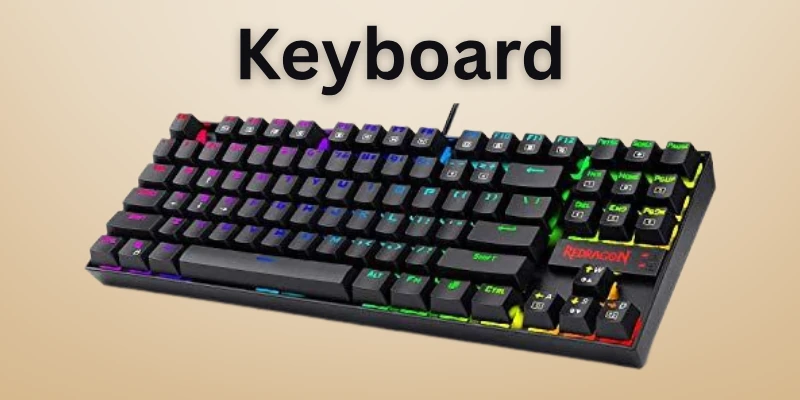
Keyboard
The keyboard is one of the most essential input devices for every computer user. It allows people to type, enter commands, and interact with software quickly and efficiently.
Keyboards come in various styles, such as standard, compact, and ergonomic designs, each suited for different needs. Understanding how a keyboard works can improve your speed, accuracy, and comfort while using a computer.
- Alphanumeric keys support letters, numbers, and symbols
- Function keys perform specific system actions
- Navigation keys move the cursor efficiently
- Shortcut combinations execute commands quickly
- Ergonomic layouts reduce strain during long typing
Example:
The Logitech K120 is widely regarded as one of the best keyboards for daily typing due to its reliability and comfortable design.
Mouse
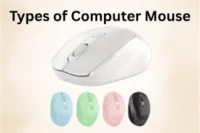
The mouse is an essential input device that helps users control the pointer on a computer screen precisely. It makes navigating software, files, and web pages faster and more intuitive.
Modern mice come in different shapes and technologies, such as ergonomic, wired, and wireless designs, to suit various needs. Mastering mouse use can improve efficiency and reduce errors during everyday computer work.
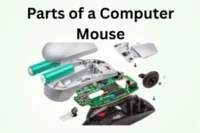
- The pointer moves smoothly across the screen
- Buttons perform specific commands quickly
- The scroll wheel enables fast scrolling
- Ergonomic design minimizes hand strain
- A high-precision sensor ensures accurate tracking
Example:
The Logitech MX Master 3 is widely regarded as one of the best mice for office and creative tasks due to its comfortable design and precise tracking.
Touchpad
The touchpad is a built-in input device found on almost all laptops. It lets users control the pointer and interact with software without needing a separate mouse. Modern touchpads offer advanced features that improve navigation, productivity, and ease of use. Mastering the touchpad can make working on a laptop faster, smoother, and more comfortable.
- Finger movements guide the pointer precisely.
- Tapping performs clicks instantly.
- Gesture shortcuts increase workflow efficiency.
- Supports customization for user preferences
- Integrated design saves workspace.
Example:
The Apple MacBook touchpad is considered one of the best due to its smooth surface, precise tracking, and responsive gesture controls.
Microphone
The microphone is an input device that captures sound and sends it to a computer for processing. It allows users to record voices, give voice commands, and communicate online effectively. Microphones come in different forms, including built-in, external, and USB models, each designed for specific purposes. Using a microphone properly ensures clear audio and enhances overall computer interactions.
- Captures sound accurately for recording
- Converts voice into digital signals
- Supports online calls and meetings
- USB connection provides easy setup
- Noise reduction improves audio clarity
Example:
The Blue Yeti USB microphone is widely regarded as one of the best for recording and online communication due to its clear sound quality and simple setup.
Joystick
A joystick is an input device designed to control movement in games, simulations, and other interactive applications. It allows users to navigate virtual environments with precision and perform actions more efficiently.
Joysticks are available in different forms, such as single-axis, dual-axis, and professional gaming models. Mastering a joystick can enhance control, improve accuracy, and make gaming or simulation experiences more immersive.
- Directional control moves smoothly.
- Buttons trigger actions instantly.
- Customizable settings improve performance.
- Compatible with multiple software platforms
- Ergonomic design reduces hand fatigue.
Example:
The Thrustmaster T.16000M is considered one of the best joysticks for flight simulators and gaming due to its precision and comfortable design.
Advanced Types of Input Devices in Computer
Advanced input devices help users interact with computers in more precise and specialized ways. They are used in professional, gaming, and creative tasks where ordinary devices may not be enough. Learning about these devices can improve efficiency and open new possibilities for digital work.
Let’s quickly check the list of advanced input devices:
- Graphics Tablet
- Digital Pen/Stylus
- Game Controller
- Motion Sensor Devices
- Biometric Scanner
Now, let’s move on to the details of each device:
Graphics Tablet
A graphics tablet is a specialized input device that helps users create digital drawings directly on a flat surface. It connects to a computer and translates hand input into visual output on the screen. Creative professionals use it for illustration, photo editing, and detailed design projects. This device gives better flexibility and control during digital artwork.
- Pressure levels adjust stroke thickness.
- The stylus provides a pen-like experience.
- Shortcut keys reduce editing time.
- A wide surface supports detailed work.
- High report rate improves responsiveness.
Example:
The Wacom Intuos Pro is widely considered one of the best graphics tablets because it offers strong build quality and smooth performance for professional design work.
Digital Pen/Stylus
A digital pen, also called a stylus, is a modern input device designed for touch-enabled screens. It allows users to write, sketch, and interact with digital content more comfortably than using fingers.
Many students and professionals rely on it for note-taking and creative projects. This tool improves control and makes screen interaction feel smooth and responsive.
- Palm rejection prevents unwanted input.
- Tilt detection creates shading effects.
- Pressure levels adjust stroke intensity.y
- Shortcut buttons improve workflow speed
- Magnetic design supports easy storage
Example:
The Apple Pencil (2nd generation) is widely considered one of the best digital pens because it delivers accurate performance and a natural writing experience on compatible devices.
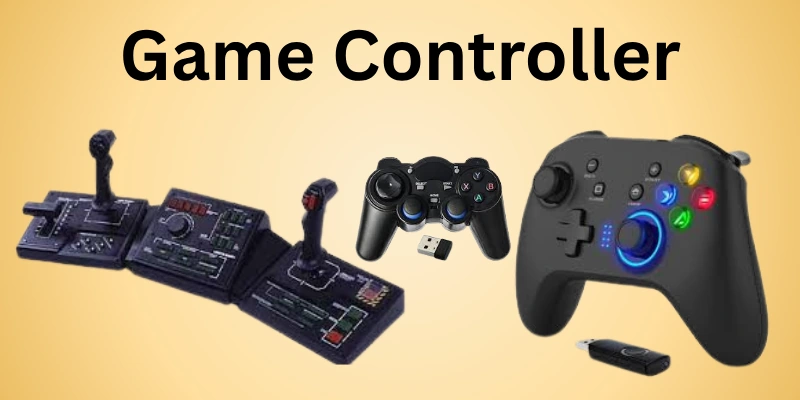
Game Controller
A game controller is a device that players hold to interact with video games. It allows users to guide characters, make selections, and respond quickly during gameplay.
The device works with consoles, PCs, and some mobile systems. Its button layout helps players react faster in competitive matches. Different models support various gaming styles and preferences.
- Dual motors create vibration effects.
- Trigger buttons manage speed control.
- D-pad supports directional commands.
- Rechargeable battery powers long sessions
- Motion sensors detect physical movement.
For example, the PlayStation 5 controller includes adaptive triggers and built-in motion detection that enhance racing and sports games with realistic responses.
Motion Sensor Devices
Motion sensor devices detect movement in a defined area and respond automatically. They track changes in position from people, animals, or objects within range. These devices are widely used in homes, offices, and security systems to improve safety and convenience.
They trigger actions immediately when movement occurs, saving time and effort. Advanced models work reliably both indoors and outdoors.
- Infrared sensors measure body heat.
- Ultrasonic waves track moving objects.
- Wide detection angle covers areas.
- Low power mode saves energy.
Example:
Automatic hallway lights switch on instantly when a motion sensor detects someone entering, increasing convenience while reducing unnecessary electricity use.
Biometric Scanner
A biometric scanner is an advanced input device that identifies people using unique physical or behavioral characteristics. It provides fast and secure verification for computers, smartphones, and secure systems.
These scanners reduce the need for passwords or ID cards, improving both convenience and safety. Modern devices work accurately under different conditions, making them ideal for high-security environments. Using biometric scanners ensures controlled access while saving time.
- Fingerprint sensors capture unique patterns.
- Iris scanners read detailed eye features.
- Facial recognition grants secure access
- Voice verification supports hands-free identification.
Example:
Many modern smartphones use biometric scanners to unlock devices instantly, combining fingerprint and facial recognition for security and ease of use.
Optical Types of Input Devices in Computer
Optical input devices use light, sensors, and cameras to interact with computers in modern and precise ways. They are widely used in scanning, tracking, and capturing information efficiently. Understanding these devices can help improve productivity and make digital tasks faster and more accurate.
Let’s quickly look at the main optical input devices:
- Optical Mouse
- Scanner
- Barcode Reader
- Digital Camera
- Optical Mark Recognition (OMR)
Now, let’s explore the details of each device one by one:
Optical Mouse
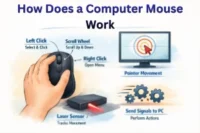
An optical mouse is an input device that uses light and sensors to detect movement on any flat surface. Unlike traditional mechanical mice, it does not have a moving ball, making it more reliable and precise.
Users commonly use it for work, gaming, and creative tasks on digital computers. Optical mice offer faster response times, smooth navigation, and better control for detailed operations. Modern models often include additional features to enhance efficiency and ease of use.
- LED sensor tracks surface movements
- No moving parts reduces maintenance
- Advanced sensor enhances cursor accuracy
- Lightweight design reduces hand strain.
Example:
The Logitech MX Master 3 is considered one of the best optical mice because of its precise tracking, smooth performance, and comfortable design for long sessions.
Scanner
A scanner is an optical input device that converts physical documents, photos, and images into digital form. It captures content quickly and accurately, making it ideal for offices, schools, and creative projects.
Modern scanners work with software to store, edit, or enhance scanned material efficiently. Using a scanner saves time, improves productivity, and helps preserve important physical records. High-resolution scanning ensures that every detail is captured clearly for digital use.
- Flatbed design handles large items.s
- The automatic feeder processes multiple pages
- Enhanced sensors detect subtle textures
- Supports direct file-saving formats
Example:
The Epson Perfection V600 is considered one of the best scanners because it delivers sharp, high-resolution scans and works efficiently for documents, photos, and slides.
Barcode Reader
A barcode reader is an optical input device that scans barcodes and converts them into digital data for computers. It is widely used in retail, inventory, and logistics to track products accurately. Modern barcode readers can scan various types of codes and connect via wired or wireless interfaces.
These devices speed up operations while reducing errors, making them essential for efficient workflows. Using a barcode reader improves accuracy and productivity across many industries.
- Laser sensors read printed codes.
- Wireless models increase scanning mobility.
- Supports multiple barcode formats
- Durable design withstands frequent use.
Example:
The Honeywell Xenon 1900 is considered one of the best barcode readers because it scans, supports many barcode types, and performs reliably in busy retail and warehouse environments.
Digital Camera
A digital camera is an optical input device that captures images or videos and converts them into digital files for computers. It allows users to record high-quality visuals for personal, professional, or creative projects.
Modern digital cameras include features like autofocus, image stabilization, and high-resolution sensors to improve clarity and detail. Many cameras can transfer data directly to computers or cloud storage, simplifying editing and sharing. Using a digital camera enhances workflow efficiency and ensures images are preserved in digital form.
- An advanced sensor ensures image clarity.
- Autofocus delivers sharp visuals consistently.
- Wi-Fi connection enables easy sharing.
- Built-in stabilization reduces motion blur.r
Example:
The Canon EOS 90D is widely regarded as one of the best digital cameras because it provides excellent image quality, fast autofocus, and reliable connectivity for professional and creative work.
Optical Mark Recognition (OMR)
Optical Mark Recognition (OMR) is an input device that reads specially marked areas on forms, surveys, or tests and converts them into digital data. It allows organizations to process information quickly and accurately without manual entry.
OMR devices are widely used in schools, universities, and research projects to handle large volumes efficiently. Modern systems can scan thousands of sheets in minutes while maintaining high precision. Using OMR technology ensures faster, more reliable data collection and reporting.
- Detects marks accurately on sheets.
- Processes bulk forms efficiently
- Minimizes manual entry errors
- Supports various formats
Example:
Many standardized exams use OMR sheets, allowing administrators to scan thousands of answer sheets quickly, ensuring accurate results and fast reporting.
Future Input Technologies
Input devices are evolving rapidly, introducing smarter and more innovative ways to interact with computers. Emerging systems focus on enhancing speed, accuracy, and convenience, moving beyond traditional keyboards and mice.
Researchers are developing technologies that allow more immersive and intuitive control, making digital tasks effortless. These advancements integrate sensors, AI, and wearable technology to create seamless interaction experiences. Exploring these future devices gives a glimpse into the next generation of human-computer interfaces.
Let’s explore some future input technologies:
- Gesture Control: Operate computers using hand and body movements effortlessly.
- Brain-Computer Interface: Convert neural signals directly into device commands.
- Augmented Reality: Combine digital visuals with the real world interactively.
- Virtual Reality Controllers: Provide immersive control for gaming and simulation.
- Voice Recognition: Use spoken commands for hands-free operation.
- Haptic Feedback: Simulate touch sensations for realistic digital interaction.
- Wearable Devices: Sensors in clothing or accessories enable seamless control.
Conclusion
In this guide, we have covered types of input devices in computer, taking a close look at common, advanced, and optical devices. Learning about these devices helps you use technology more effectively, whether for study, work, or entertainment.
Personally, I recommend exploring multiple types, as combining traditional and modern devices can make your digital experience smoother and more enjoyable. Understanding these input tools also prepares you for future technologies. I hope this guide offered valuable insights to help you choose the right devices for your needs.
Thank you very much for reading, and I appreciate your time and attention. Don’t skip the next part of the FAQs. I hope you will find something more interesting, so don’t miss it. If you miss it, you may lose something new.
FAQS: Types of Input Devices in Computer
Now that you know the types of input devices, let’s move on to the FAQs to answer all your important questions.
Future input devices include gesture control, brain-computer interfaces, haptic feedback, and wearable sensors. These technologies focus on hands-free interaction, immersive experiences, and higher accuracy. They will make computing more natural and interactive. Learning about these future devices helps you stay updated with technology trends
For beginners, simple devices like keyboards, mice, and touchpads are the best. They are easy to use and widely available. Beginners can gradually explore advanced or optical devices as they gain experience. Starting with common devices ensures smooth learning.
Advanced input devices like graphics tablets, game controllers, and digital pens provide precision and better control. They are designed for professional, creative, or gaming tasks. Using these devices enhances accuracy, reduces errors, and improves user experience. Advanced devices help you perform specialized tasks effectively.
Advanced input devices like graphics tablets, game controllers, and digital pens provide precision and better control. They are designed for professional, creative, or gaming tasks. Using these devices enhances accuracy, reduces errors, and improves user experience. Advanced devices help you perform specialized tasks effectively.
Input devices in a computer are tools used to enter data or commands. They include devices like keyboards, mice, scanners, and microphones. These devices allow users to interact with the system easily. Understanding input devices helps improve computer usage efficiency.
Optical input devices use light and sensors to capture data, like scanners, optical mice, and barcode readers. They provide precise and fast input without physical contact in some cases. These devices are widely used in offices, retail, and creative work. Optical devices improve accuracy and efficiency.
Yes, a mouse is a common input device that controls the cursor and allows navigation on a computer screen. It can be optical, laser, or trackball-based. Mice are essential for precise selection, dragging, and clicking tasks. Using a mouse improves efficiency in almost every software application.
A graphics tablet is an advanced input device that lets users draw or write directly on a surface with a stylus. It converts pen movements into digital data on a computer. Artists, designers, and architects often use graphics tablets for precise digital illustration. They offer higher control than a standard mouse.

- Be Respectful
- Stay Relevant
- Stay Positive
- True Feedback
- Encourage Discussion
- Avoid Spamming
- No Fake News
- Don't Copy-Paste
- No Personal Attacks
- Be Respectful
- Stay Relevant
- Stay Positive
- True Feedback
- Encourage Discussion
- Avoid Spamming
- No Fake News
- Don't Copy-Paste
- No Personal Attacks
