Types of Motherboards Build a Fast and Powerful Computer
Published: 12 Feb 2026
You buy a motherboard, bring it home, and then realize your RAM speed does not match or your graphics card blocks other slots. Many people make this mistake because they focus only on price and ignore important technical details.
I have helped many users fix these problems, and I always tell them to understand the types of motherboards before making any purchase. Choosing the right board is not just about fitting parts; it affects your computer’s speed, reliability, and even how long it lasts.
In this article, we explain everything clearly so you can choose the right board with confidence. I also share tips from my own experience to help you avoid common mistakes and get the best performance. When you make the correct choice, your system runs smoothly, stays stable, and gives you better upgrade options in the future.
Without wasting time, let’s dive into the article and explore the different types of motherboards in detail.
Types of Motherboards Step By Step
Choosing the right motherboard can feel confusing at first. Each type has unique features that affect your PC’s performance, upgrades, and stability. Let’s break it down step by step so you know exactly what to look for.
Let’s take a look at the main types of motherboards.
- ATX
- Micro-ATX
- Mini-ITX
- Extended ATX (E-ATX)
- XL-ATX
- Flex-ATX
- BTX
- Nano-ITX
- Pico-ITX
Now that you see all the types, let’s explore their details one by one.
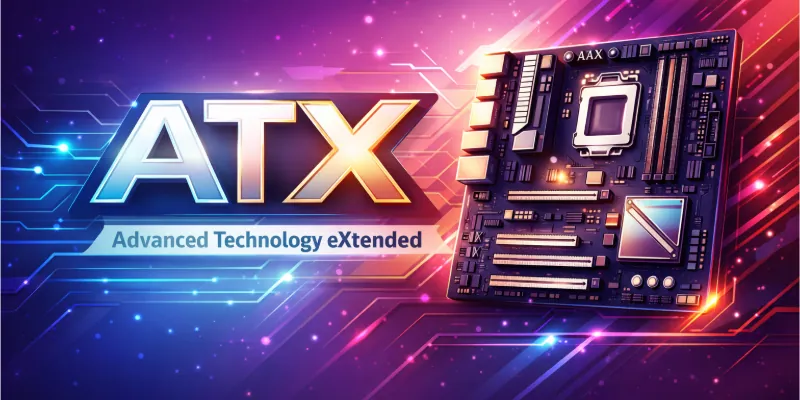
1. ATX
ATX motherboards are the most popular choice for desktop PCs. They provide a balanced mix of performance, expandability, and compatibility. Many gamers and professionals prefer ATX boards because they support multiple graphics cards and large RAM capacities.
These boards also offer enough space for cooling solutions and storage devices. If you want a versatile motherboard that fits most mid- to high-end builds, ATX is often the safest option.
Key Features:
- Multiple USB and SATA ports for peripherals
- Robust VRM design for stable power delivery
- Supports high-end CPU overclocking
- Easy cable management and airflow options
2. Micro-ATX
Micro-ATX boards are smaller than ATX but still powerful enough for most users. They fit in smaller cases, making them great for compact desktops. Despite the size, they often support enough RAM and expansion slots for home and office setups.
Many budget-conscious builders choose Micro-ATX because it balances price and performance. These boards are flexible but slightly limited compared to full-size ATX in advanced gaming or workstation setups.
Key Features:
- Multiple PCIe slots for graphics cards
- Adequate VRM for stable power delivery
- Supports mid-range CPU overclocking
- Several USB and storage connections
3. Mini-ITX
Mini-ITX motherboards are designed for ultra-compact systems and small form-factor PCs. They are perfect for users who want a minimalist build or a portable gaming system. These boards have fewer expansion slots and RAM capacity but can still deliver solid performance for daily tasks.
Cooling options are limited due to the small size, so proper planning is essential. Mini-ITX is ideal for home theater PCs, small gaming rigs, or portable workstations.
Key Features:
- Supports a single high-performance GPU
- Efficient power delivery for small CPUs
- Several USB and storage ports included
- Compact layout allows custom cooling
4. Extended ATX (E-ATX)
Extended ATX, or E-ATX, motherboards are larger than standard ATX boards. They are designed for high-performance gaming PCs, workstations, and servers. These boards provide extra space for multiple graphics cards, larger RAM capacities, and advanced cooling solutions.
Professionals often choose E-ATX for projects that require heavy multitasking or rendering. The large size allows better component placement and airflow, which improves stability under heavy load. If you need a motherboard that can handle extreme builds, E-ATX is often the preferred choice.
Key Features:
- Supports multiple USB-C and Thunderbolt ports
- Robust VRM for stable power delivery
- Optimized cable management for airflow
- Extra M.2 and SATA storage slots
5. XL-ATX
XL-ATX motherboards are an extended version of ATX, mainly used for extreme gaming or high-end workstations. They offer more PCIe slots than standard boards and often include extra power phases for stability. These boards are perfect for users who want multiple GPUs or advanced expansion options.
Despite the size, XL-ATX fits in large cases designed for high-performance builds. Professionals choose XL-ATX when they need maximum connectivity, overclocking support, and robust system reliability. The large design allows efficient cable management and better heat dissipation.
Key Features:
- High-quality VRM for stable overclocking
- Multiple fan headers for advanced cooling
- Several M.2 and SATA storage slots
- Built-in Wi-Fi 6 and Ethernet ports
6. Flex-ATX
Flex-ATX motherboards are a smaller, more flexible version of ATX boards. They are ideal for compact desktops or small office PCs. Despite their size, they provide enough expansion options for moderate RAM and graphics cards.
Flex-ATX is often chosen when space is limited, but performance cannot be sacrificed. These boards support standard cooling solutions and maintain stable performance in tight cases. Small builds, budget workstations, or office setups often rely on Flex-ATX for reliability and efficiency.
Key Features:
- Several fan headers for better cooling
- VRM design ensures stable power delivery
- Multiple USB and connectivity ports
- Extra SATA and M.2 storage slots
7. BTX
Some older systems used BTX motherboards to improve cooling and reduce heat. These boards positioned components for better airflow compared to ATX layouts. Gamers and workstation users preferred BTX for its ability to keep CPUs and GPUs stable under load.
They also offered more consistent power delivery for high-end components. Even though modern ATX and E-ATX boards have largely replaced BTX, some legacy systems still rely on them. Understanding BTX helps when upgrading or maintaining older PCs.
Key Features:
- Legacy port support for older peripherals
- Optimized case placement for airflow
- Compatible with specialized cooling units
- Supports moderate PCIe expansion cards
8. Nano-ITX
Nano-ITX boards are extremely small and ideal for embedded systems and compact PCs. They provide enough functionality for specialized tasks, like media centers or small industrial computers. These boards usually include integrated graphics and networking options due to limited expansion slots.
Despite their size, Nano-ITX boards can handle solid performance for dedicated applications. Many developers and hobbyists prefer Nano-ITX for its portability and low power consumption. Small form-factor projects often benefit from their flexibility and minimal footprint
Key Features
- Multiple SATA and M.2 storage slots
- Several fan headers for airflow
- Compact VRM design ensures stable power
- Supports USB-C and legacy ports
9. Pico-ITX
Pico-ITX is one of the tiniest motherboard formats available today. These boards are mostly used in ultra-compact systems, embedded devices, or IoT projects. Their extremely small size limits expansion slots, but they still provide essential connectivity and processing power.
Cooling solutions are minimal, so thermal management is important. Despite the constraints, Pico-ITX allows designers to build highly portable and efficient devices. They are perfect for specialized applications that require very small hardware footprints.
Key Features
- Several USB and networking ports
- Fan headers for basic cooling
- M.2 and SATA storage support
- Compact VRM ensures stable power
Motherboard Types and Compatibility
Not every motherboard fits every setup. You need to check technical details before buying any component. A small mismatch can stop your system from working properly. When you understand compatibility clearly, you save time, money, and frustration during installation.
- Processor Socket Matching: Confirm the exact socket version to ensure the CPU installs and functions correctly.
- Memory Capacity Limits: Review the maximum supported RAM size and frequency before purchasing memory modules.
- Expansion Slot Configuration: Check available PCIe lanes for graphics cards and additional hardware.
- Power Connector Requirements: Ensure your power supply provides the correct pin layout and wattage support.
- BIOS Version Support: Verify firmware compatibility, especially for newer processor generations.
- Storage Technology Options: Look for NVMe, SATA, and RAID support based on your performance needs.
Conclusion
In this guide, we have covered the types of motherboards. You now understand how different designs support different users and purposes. I personally recommend finding the right balance between compatibility, future upgrades, and cost instead of choosing only the most expensive option. A smart balance always leads to better results. It was a pleasure sharing this information with you. I hope it helped you clearly understand the topic.
Don’t skip the next part of the FAQs. I hope you will find something more interesting, so don’t miss it. If you miss it, you may lose something new.
FAQS: Types of Motherboards
Now, let’s look at some frequently asked questions about types of motherboards. These points will solve common doubts and give you more clarity.
For gaming PCs, ATX and Micro-ATX motherboards are usually the best choice. They offer more PCIe slots for graphics cards and better cooling support. Many gaming motherboards also include advanced chipsets and overclocking features. Always check compatibility with your CPU and GPU.
Yes, Mini-ITX motherboards are ideal for compact and small form factor PCs. They save space and fit in small cases easily. However, they usually have fewer expansion slots. They are perfect for home office setups or lightweight gaming builds. Despite their size, they can still deliver reliable performance for everyday tasks and casual gaming.
No, different types of motherboards support different CPU sockets. For example, Intel and AMD processors require specific socket types. Even within the same brand, compatibility may vary. Always confirm the socket type before buying.
A motherboard form factor refers to its physical size and layout design. It determines how many ports, slots, and connectors it can have. Common form factors include ATX, Micro-ATX, and Mini-ITX. The form factor must match your computer case.
For beginners, ATX and Micro-ATX motherboards are usually the best options. They are widely available and easy to install. These boards support common components and upgrades. They also offer better value for money. Additionally, their compatibility with most cases and processors makes them a worry-free choice for first-time builders.
Motherboard types do not directly increase FPS, but they affect system stability and upgrades. A better motherboard supports faster RAM and advanced GPUs. It also allows better cooling and overclocking. So indirectly, it supports overall performance. Choosing the right motherboard ensures smoother gameplay and a more reliable gaming experience over time.
E-ATX stands for Extended ATX. It is larger than standard ATX motherboards. It offers more PCIe slots, RAM slots, and advanced features. It is mostly used in high-end gaming or professional workstations. The extra space also allows better cooling solutions, making it ideal for powerful components.
Mini-ITX and Micro-ATX motherboards are great for office computers. They are affordable and space-saving. These boards support basic tasks like browsing, MS Office, and video calls. They are also energy efficient. Additionally, their compact design makes them easy to install in small office setups without compromising performance.
High-end motherboard types like E-ATX are used for gaming, video editing, and 3D rendering. They support powerful CPUs and multiple GPUs. They also allow more RAM capacity. Professionals prefer them for heavy workloads. These motherboards often include advanced cooling solutions and extra connectivity options to handle demanding tasks efficiently.
A good-quality motherboard can last for many years. Its lifespan depends on usage and maintenance. Proper cooling and a stable power supply increase durability. Choosing the right type of motherboard also improves longevity. Regular cleaning and timely BIOS updates can also help keep your system running smoothly for a long time.



- Be Respectful
- Stay Relevant
- Stay Positive
- True Feedback
- Encourage Discussion
- Avoid Spamming
- No Fake News
- Don't Copy-Paste
- No Personal Attacks
- Be Respectful
- Stay Relevant
- Stay Positive
- True Feedback
- Encourage Discussion
- Avoid Spamming
- No Fake News
- Don't Copy-Paste
- No Personal Attacks
