What Is the Microcomputer How It Can Boost Your Life and Work
Published: 9 Feb 2026
Do you often get frustrated with slow or bulky computers that make even simple tasks take too long? Microcomputers are small, powerful systems designed to solve exactly that problem.
They can run applications, store important data, and perform calculations quickly, all while taking up very little space. From personal laptops to devices in smart homes, microcomputers quietly manage countless tasks every day, making life easier and more productive.
In this guide, we have covered what is the microcomputer in a simple and clear way, helping you understand how these compact machines handle big jobs without overwhelming you. By the end, you will see why microcomputers have become essential in both work and daily life.
Definition of Microcomputer
A microcomputer is a small, personal computer designed to perform tasks efficiently. It combines a processor, memory, and storage in a compact system. These devices are widely used in homes, schools, and offices. Microcomputers make computing accessible and practical for everyday tasks.
- Provides fast performance for tasks
- Supports running several programs
- Keeps information organized safely
- Enables a smooth workflow daily
- Fits easily in any setup
History of Microcomputer
Microcomputers started as small, affordable alternatives to large mainframes in the early 1970s. Engineers, hobbyists, and students began building tiny systems that could perform useful tasks.
Over the decades, microcomputers evolved rapidly, becoming faster, smarter, and essential for homes, offices, and schools. Their development changed how people work, learn, and interact with technology.
- 1971 – Intel released the 4004 microprocessor, which marked the first commercially available CPU, designed for compact computing systems
- Early 1970s – Hobbyist kits: Enabled enthusiasts to assemble basic computers at home and explore programming freely
- 1975 – Altair 8800 launched: Sparked curiosity among engineers and students, encouraging experimentation with personal computing
- 1977 – Apple II debuted: Offered color graphics and an intuitive interface, gaining popularity in classrooms and offices
- 1981 – IBM introduced the PC architecture, setting a global standard for PC architecture and boosting compatibility and software development worldwide
- Mid-1980s – Desktop adoption: Allowed businesses and educational institutions to implement microcomputers for various daily tasks
- Late 1980s—Technology advanced: Delivered faster processors, higher memory capacity, improved storage, and expanded software options
Evolution of Microcomputer
Microcomputers have changed drastically since their early days. Over time, they became faster, more efficient, and capable of handling complex tasks. Manufacturers continuously improved processors, memory, and storage, making these devices more powerful and versatile.
This evolution helped microcomputers move from simple hobbyist machines to essential tools in homes, schools, and businesses.
- Early models featured basic processors, minimal memory, and simple input/output systems for experimental computing
- Personal computers offered keyboards, monitors, and storage drives, making microcomputers practical for individuals
- Desktop expansion introduced standardized hardware and software for wider adoption across offices and schools
- Software development supported word processors, spreadsheets, and educational programs that expanded the usefulness for users
- Performance improvements delivered: Faster CPUs, larger RAM, and advanced graphics for demanding applications
- Portability became: Laptops and compact devices, allowing users to work and study anywhere
- Smart integration enabled embedded systems, IoT devices, and advanced personal computing environments
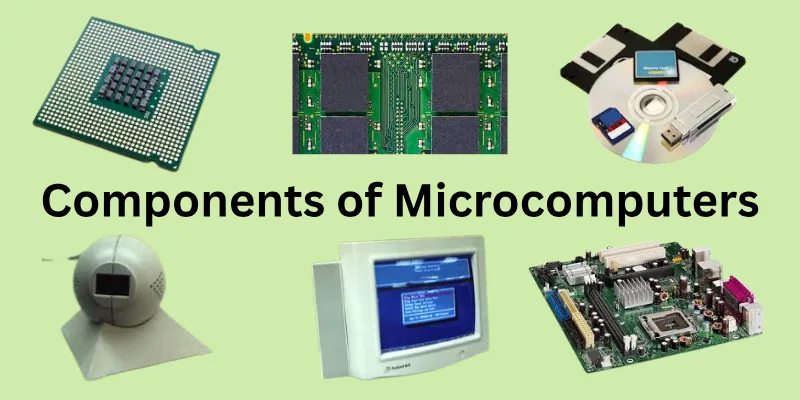
Components of Microcomputers
Microcomputers rely on several essential components to function smoothly. Each part has a specific role, working together to process, store, and display information.
The right combination of hardware allows users to run programs, store data, and interact efficiently. Knowing these components helps you understand how microcomputers manage everyday tasks effectively.
- Central Processing Unit: Handles calculations, executes instructions, and coordinates all operations of the computer system
- Random Access Memory: Temporarily stores data and instructions for fast access during active tasks and applications
- Storage Devices: Maintain long-term data, files, and software securely for continued accessibility
- Input Devices: Allow users to enter commands and data using keyboards, mice, and other interactive tools
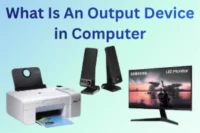
- Output Devices: Display processed information through screens, printers, and audio systems for user interaction
- Motherboard Assembly: Connects all internal components, enabling communication between the processor, memory, and peripherals
- Power Supply Unit: Provides stable electricity, ensuring safe operation and consistent performance of all parts.
How Microcomputers Work
Microcomputers operate by combining hardware and software to perform tasks efficiently. The processor executes instructions while memory temporarily holds data for quick access. Storage devices retain information for future use, and input/output components allow interaction with users.
All components work together seamlessly to make computing fast, reliable, and practical for everyday needs.
- Processor manages operations: Performs calculations, executes logic, and directs commands to other hardware components
- Temporary memory stores: Keeps active programs and data ready for rapid access during ongoing tasks
- Long-term storage preserves: Safely maintains files, applications, and system information for future use
- User input devices: Enable typing, clicking, and interaction through keyboards, mice, and touchscreens
- Output devices present: Display results, visuals, and sound to communicate processed information clearly to users
- Motherboard links components: Forms the main circuit connecting CPU, memory, storage, and peripheral devices seamlessly
- Power supply maintains energy: Delivers consistent electricity to all parts, preventing interruptions and hardware damage
Types of Microcomputers
Microcomputers come in different forms to meet various needs and environments. Some are designed for personal use, while others handle business, scientific, or educational tasks. They vary in size, performance, and portability to suit different user requirements. Understanding the types helps you choose the right system for work, learning, or entertainment.
- Desktop microcomputers: Designed as stationary systems, offering high processing power and versatile connectivity for multiple applications
- Laptop computers: Compact, portable devices with integrated display and battery, suitable for working or studying from any location
- Notebook computers: Lightweight alternatives to laptops, focusing on mobility without compromising essential computing features
- Workstations: Advanced machines built for demanding tasks such as 3D modeling, simulations, and professional software operations
- Servers: Configured to manage network resources, handle large-scale data, and provide services for multiple users simultaneously
- Embedded systems: Built into appliances, machinery, and devices to perform specific functions efficiently without user intervention
- Handheld computers: Small, portable devices that perform computing tasks on the go, often equipped with touchscreens and wireless capabilities
Features of Microcomputers
Microcomputers are designed to deliver reliable performance for individual users. They support a wide range of tasks, from basic computing to advanced applications. These systems balance power, size, and cost to meet everyday needs. Their flexibility makes them suitable for homes, offices, and educational environments.
- Compact design: Requires minimal physical space while fitting easily on desks, tables, or small work areas
- User-friendly operation: Allows people with basic computer knowledge to operate systems without technical training
- Affordable cost: Offers budget-friendly options compared to larger computer systems, making them accessible to many users
- Moderate processing power: Handles routine tasks such as browsing, document creation, and multimedia usage smoothly
- Expandable capability: Supports hardware upgrades like memory, storage, or peripherals when performance needs grow
- Low energy usage: Consumes less electricity, helping reduce power costs and environmental impact
- Wide software support: Runs various operating systems and applications for work, learning, and entertainment
Uses of Microcomputers
Microcomputers help people complete daily digital tasks quickly and efficiently. They support personal, educational, and professional activities without requiring complex technical skills. Their ease of use makes them suitable for users of all ages.
Let’s look at the most common ways microcomputers are used in daily activities.
- Document creation tasks: Allow users to write reports, prepare assignments, and format official files with ease
- Internet browsing activities: Enable fast access to websites, online services, research platforms, and digital resources
- Educational learning support: Assist students and teachers with online classes, presentations, and interactive study tools
- Personal data management: Help individuals store files, organize photos, and manage digital records securely
- Communication and sharing: Support emails, video calls, and file transfers for personal and professional interaction
Applications of Microcomputers
Microcomputers serve as core digital systems in many sectors of modern society. Different industries apply them to support structured workflows and system-based operations. Their role depends on the environment rather than individual user actions.
Let’s look at the main areas where microcomputers are commonly applied.
- Academic environments: Used as standard computing systems in schools, colleges, universities, and training centers
- Corporate organizations: Applied as office-based machines within companies for internal operational support
- Medical institutions: Installed across hospitals, clinics, laboratories, and healthcare centers as a support system
- Creative industries: Adopted in studios, agencies, and production houses as digital workstations
- Commercial sectors: Deployed in shops, malls, service centers, and retail chains for system-based operations
Benefits of Microcomputers
Microcomputers provide users with fast, reliable, and affordable computing solutions. They simplify daily tasks and improve efficiency for personal, educational, and professional work. Their adaptability allows them to fit various environments without requiring technical expertise.
Let’s look at the key advantages microcomputers offer to users in different fields.
- Cost-effective, providing powerful computing at a low cost
- Compact and portable for easy placement and transport
- User-friendly and simple for beginners and experienced users
- Saves time by handling tasks quickly and efficiently
- Energy-efficient, using less electricity for operation
- Runs a wide range of software for work and study
- Performs multiple tasks for personal and professional use
Limitations of Microcomputers
Microcomputers are highly useful, but they have certain constraints that users should consider. Their performance can be limited when handling very large datasets or complex computations.
They may not be suitable for heavy industrial applications or high-end scientific simulations. Understanding these limitations helps users make informed decisions about where and how to use microcomputers effectively.
Let’s look at the main drawbacks of microcomputers.
- Restricted processing power limits complex calculations
- Smaller memory and storage can slow down programs
- Limited upgrade options reduce future scalability
- Less robust hardware increases the risk of failures
- Not suitable for large-scale network operations
- Weaker graphics affect design and media work
- Performance drops if peripherals are outdated
Microcomuters VS Minicomputers
Have you ever thought about why some computers sit on your desk while others run entire offices? Microcomputers are perfect for personal use, handling daily tasks quickly and easily. Minicomputers, on the other hand, are built to support multiple users and heavier workloads. Understanding these differences can help you pick the right system for your needs.
Let’s look at the main features of each type.
Microcomputer
Microcomputers are small, affordable systems designed for individual users. They handle daily tasks efficiently, from browsing and office work to media and learning. Their compact size and ease of use make them ideal for homes, schools, and small offices.
Let’s look at the main features of microcomputers.
- Small and compact, easily fitting on desks or in a small space
- Designed for a single user at a time
- Handles routine tasks like documents, browsing, and multimedia
- Affordable and accessible for personal or small office use
- Lightweight and portable for easy movement
Minicomputer
Imagine a machine powerful enough to run an entire office or a busy research lab at once. Minicomputers are designed to handle multiple users at the same time. They process large amounts of data and keep complex operations running smoothly. Without them, many businesses and technical projects would struggle to function efficiently.
Let’s explore the main features of minicomputers.
- Larger and more robust for heavy workloads
- Supports multiple users simultaneously without slowdown
- Processes large datasets quickly and efficiently
- Requires professional setup and maintenance regularly
- Typically stationary and needs a dedicated space
Future of Microcomputers
Microcomputers have already transformed the way we live, work, and learn. In the coming years, they are expected to become even more powerful, compact, and intelligent. Advancements in technology will allow microcomputers to integrate seamlessly into our daily lives and professional environments.
Let’s explore the exciting possibilities for the future of microcomputers.
- Enhanced processing power: Microcomputers will perform complex tasks faster and more efficiently
- Smarter connectivity options: They will connect seamlessly with IoT devices and cloud networks
- Improved portability features: Devices will become lighter, thinner, and easier to carry
- Advanced energy efficiency: Future systems will consume less power without losing performance
- Expanded software capabilities: Users will access more powerful and versatile applications
- Better security measures: Microcomputers will include advanced protection against cyber threats
- Integration with AI tools: They will assist users with smarter automation and decision-making
Conclusion
In this guide, we have covered what is the Microcomputer. While microcomputers offer great convenience and efficiency, they also come with certain limitations and risks, such as limited memory or potential security issues. I recommend using them wisely by keeping software updated, backing up important data, and choosing systems suitable for your tasks.
Thank you for reading, and I hope this guide was helpful for you. Don’t skip the next part of the FAQs. I hope you will find something more interesting, so don’t miss it. If you miss it, you may lose something new.
FAQS: What Is the Microcomputer
Let’s answer the most common questions about microcomputers. This will help you understand them better and clear any doubts you might have.
Microcomputers are used for everyday tasks like browsing the internet, creating documents, and managing media files. They are ideal for personal, educational, and small office use. These systems allow users to perform tasks efficiently at home or work
A microcomputer typically includes a CPU, RAM, storage, input/output devices, and a display. Each part works together to process data and perform tasks efficiently. Modern microcomputers also include network adapters for internet connectivity.
Microcomputers can run most standard software, like office tools, browsers, and media applications. However, heavy programs like large databases or 3D rendering may require more powerful systems. For personal or educational use, microcomputers are sufficient.
Yes, microcomputers are often compact and lightweight. Laptops, tablets, and small desktops fall under this category. Portability allows users to work from home, school, or even while traveling. This convenience also makes it easier to carry important files and stay productive anywhere, without being tied to a single location
The speed of a microcomputer depends on its processor, RAM, and storage. Modern microcomputers are fast enough for browsing, video streaming, and office tasks. High-end microcomputers can handle more intensive applications smoothly.
Microcomputers can run Windows, macOS, Linux, or Chrome OS. The choice depends on user preference and the tasks they perform. Each system provides essential tools for work, education, and entertainment. Users can also customize settings and install additional applications to make their microcomputer more efficient and suited to their needs
Microcomputers store data on hard drives, SSDs, or cloud storage. This allows quick access to files and applications. Users can expand storage depending on their needs and system capabilities. Additionally, proper organization of files and regular backups help maintain smooth performance and prevent data loss
Understanding microcomputers helps you choose the right system for work, study, or personal use. They are the backbone of everyday computing and digital tasks. Learning about them empowers you to use technology efficiently and safely.
Yes, modern microcomputers can multitask efficiently with sufficient RAM and processor speed. Users can browse, edit documents, and stream videos simultaneously. High-end microcomputers can handle several heavy applications without lag.
Yes, many microcomputers allow upgrades such as increasing RAM, storage, or adding peripherals. This extends their lifespan and improves performance. Users should check compatibility before upgrading components. Regular upgrades also help the system keep up with new software and maintain smooth, efficient operation over time.

- Be Respectful
- Stay Relevant
- Stay Positive
- True Feedback
- Encourage Discussion
- Avoid Spamming
- No Fake News
- Don't Copy-Paste
- No Personal Attacks
- Be Respectful
- Stay Relevant
- Stay Positive
- True Feedback
- Encourage Discussion
- Avoid Spamming
- No Fake News
- Don't Copy-Paste
- No Personal Attacks
