What is Computer Hardware
Published: 11 Mar 2026
Computers are made up of many physical components that work together to make everything run smoothly. These parts, known as computer hardware, include the processor, RAM, hard drives, graphics cards, and more.
Each piece has a specific role, and when one fails or is outdated, your system can slow down or stop working properly. Understanding hardware helps you troubleshoot problems, make smart upgrades, and keep your computer performing at its best.
In this article, we have covered what is computer hardware, how it works, and why it matters for everyone who uses a PC.
Without wasting time, let’s jump into the article and explore computer hardware to understand how each part powers your PC.
Definition of Computer Hardware
Computer hardware is the physical part of a computer that you can see and touch. These components work together to make your system run smoothly. From processing information to storing files, each piece plays a vital role. Learning about hardware helps you understand, maintain, and improve your PC.
- The CPU executes instructions fast
- RAM stores data temporarily
- A hard drive keeps files safe.
- GPU creates sharp graphics
- The motherboard links all components
- Power supply delivers stable energy
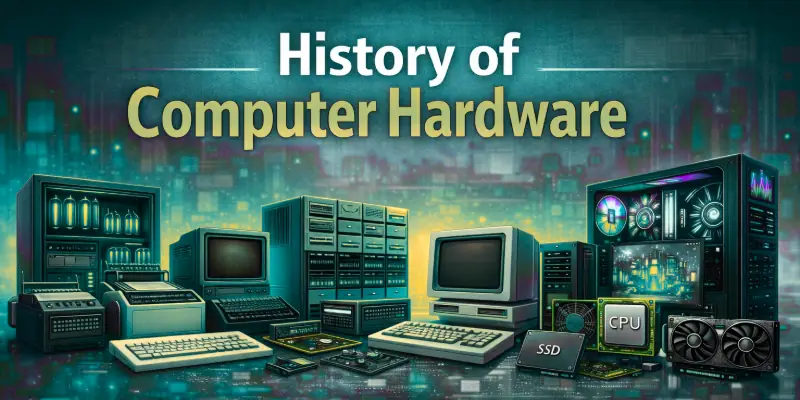
History of Computer Hardware
The history of computer hardware shows how technology has constantly improved over the years. Early computers were huge machines that could only perform basic calculations. Engineers gradually introduced faster, smaller, and more efficient components that transformed how people use computers today. Learning this history gives us a clear view of how each breakthrough shaped modern technology.
- 1940s—ENIAC era: Engineers built the first electronic computers using thousands of vacuum tubes, filling entire rooms and performing calculations that amazed scientists.
- 1950s—Transistor introduction: Replacing bulky vacuum tubes with transistors made computers smaller, faster, and much more reliable than ever before.
- 1960s—Mainframe computers expand: Large organizations relied on mainframes for complex calculations, data processing, and business operations on a scale never seen before.
- 1970s—Microprocessor revolution: The release of the first microprocessor allowed engineers to design compact personal computers, changing computing forever.
- 1980s—Personal computers grow: Affordable PCs reached homes and offices, powered by improved CPUs, memory, and storage, making computing accessible to everyone.
- 1990s—Graphics and storage improve: Faster graphics cards and larger hard drives enabled smoother gaming, multimedia work, and professional applications.
- 2000s–present: The modern hardware era: Multi-core processors, solid-state drives, and advanced motherboards made computers faster, energy-efficient, and powerful enough for demanding tasks.
How Computer Hardware Works
Computer hardware works together like a team to run every task on your system. Each component performs a specific job and passes information to the next part. When you open a program, type on the keyboard, or save a file, different physical parts respond instantly. This coordination allows your computer to deliver fast and accurate results every time.
- Input stage: Devices such as the keyboard, mouse, or scanner capture your commands and send digital signals to the computer for action.
- Signal transfer: The motherboard carries these signals through tiny circuits and ensures every connected part communicates without delay.
- Processing stage: The CPU interprets instructions, performs calculations, and manages system activities to complete the requested task quickly.
- Temporary storage: RAM stores active programs and working data so the processor can access them instantly without slowing down performance.
- Permanent storage: The hard drive or SSD saves operating system files, applications, and personal documents for future use.
- Output stage: The graphics card processes visual data and sends it to the monitor, while audio components produce clear sound output.
- Power regulation: The power supply converts electricity and distributes a stable voltage to protect all hardware components from damage.
Types of Computer Hardware
Computer hardware includes many physical parts that work in different ways to support your system. Some parts sit inside the case, while others stay outside and connect when needed. Each category plays a specific role and helps your computer complete tasks efficiently. When you understand these types, you can easily identify which component performs which function.
- Input Devices: Accept user commands and data.
- Output Devices: Display results in visual or audio form.
- Processing Devices: Execute instructions and calculations.
- Storage Devices: Save data for future access.
- Motherboard Components: Connect and support internal parts.
- Power Supply Units: Provide stable electrical power.
- Communication Devices: Enable network data transfer.
Major Categories of Computer Hardware
Computer hardware falls into clear groups based on the role each part performs. These groups help you understand how a system handles input, processing, storage, and communication. When you divide hardware into categories, everything becomes easier to organize and manage. This structure also helps you choose the right components when building or upgrading a computer.
- Input Hardware: Devices that capture user actions and convert them into digital signals that the system can understand.
- Output Hardware: Components that present processed data through visuals, printed material, or sound.
- Processing Hardware: Units that control operations, perform calculations, and manage software execution.
- Primary Storage Hardware: Fast memory modules that hold active data while tasks run.
- Secondary Storage Hardware: Drives that store large amounts of information for long-term access.
- Power Management Hardware: Equipment that regulates electrical flow and protects internal circuits.
- Networking Hardware: Tools that transmit and receive data between computers and online systems.
Major Computer Hardware Components
Every computer relies on several essential physical parts to operate smoothly. These components handle everything from calculations to data storage and display. Each one performs a distinct function that keeps the system stable and responsive. When you understand these core parts, you gain better control over your computer’s performance and upgrades.
- Central Processing Unit (CPU): The processor executes instructions, performs logical operations, and directs system activities in real time.
- Random Access Memory (RAM): This memory module stores active programs and working data so the system can access them quickly.
- Storage Drive (HDD or SSD): The drive saves operating systems, applications, and personal files for long-term use.
- Motherboard: This main circuit board connects internal parts and allows them to communicate efficiently.
- Graphics Processing Unit (GPU): The graphics unit renders images, videos, and visual effects for smooth display output.
- Power Supply Unit (PSU): This unit converts electrical current and distributes steady power to all connected components.
- Cooling System: Fans or liquid cooling systems remove heat and maintain safe operating temperatures.
- Input and Output Ports: These ports enable external devices to connect and exchange data with the computer.
Uses of Computer Hardware
Computer hardware plays a vital role in making technology work in our daily lives. Each part of a computer contributes to specific tasks, from running programs to connecting with other devices.
By understanding how hardware is used, you can improve performance, solve problems, and make better decisions when upgrading or choosing devices. Hardware is not just a set of components; it’s the foundation that powers all computing activities.
- Input Devices: Capture user instructions and feed them into the system for processing tasks efficiently.
- Output Devices: Present information visually or audibly, allowing users to see results and interact with software.
- Processing Units (CPU/GPU): Execute calculations, manage operations, and ensure smooth performance across applications.
- Memory Modules (RAM): Temporarily hold active data so programs run without delays or interruptions.
- Storage Devices (HDD/SSD): Preserve documents, software, and multimedia files for long-term accessibility.
- Networking Hardware: Facilitates data transfer between computers and the internet for communication and collaboration.
- Power Supply Units: Provide consistent electricity to components, preventing failures and maintaining stability.
- Cooling Systems: Remove excess heat from hardware, ensuring devices operate safely under heavy workloads.
Functions of Computer Hardware
Computer hardware performs many essential functions that allow your system to operate efficiently. Each component has a clear role, from processing instructions to storing and displaying data. Understanding these functions helps you troubleshoot issues, optimize performance, and use your computer effectively. Every part works together to ensure smooth operation and quick response for every task you perform.
- Processing Data: The CPU executes instructions, performs calculations, and manages tasks for smooth operation.
- Storing Information: Storage devices save programs, files, and system data for long-term access.
- Temporary Data Handling: RAM holds active data and programs while the computer runs multiple tasks.
- Displaying Output: Graphics cards and monitors deliver images, videos, and visuals clearly to users.
- Power Management: The PSU supplies stable electricity to components, ensuring safe and reliable performance.
- Maintaining Temperature: Cooling systems remove heat from hardware to prevent overheating and maintain efficiency.
Pros of Computer Hardware
Computer hardware brings many benefits that make computers fast, reliable, and efficient. Each component improves how tasks are performed, whether it’s processing data, storing files, or displaying information.
By using quality hardware, your system can handle more work, reduce errors, and deliver better results. Understanding these advantages helps you make smarter decisions when buying or upgrading components.
Here are the main advantages of computer hardware.
- Increases overall system performance quickly
- Improves storage and data access
- Enhances graphics and visual quality
- Supports multitasking without slowing
- Reduces errors and hardware failures
Cons of Computer Hardware
While computer hardware offers many advantages, it also comes with some drawbacks. Components can wear out over time, and poor-quality parts may cause system problems. Upgrading or replacing hardware can be expensive and sometimes complicated. Being aware of these downsides helps users take better care of their systems and avoid unnecessary issues.
Here are the main disadvantages of computer hardware.
- Can become outdated quickly over time
- Requires regular maintenance and cleaning
- High-quality parts often cost more
- May fail and cause system errors
- Consumes electricity during constant use
Future of Computer Hardware
The future of computer hardware promises exciting advancements that will make systems faster, smaller, and more efficient. Engineers are constantly developing new technologies to improve performance, energy use, and reliability.
Emerging innovations will change how we interact with computers and how devices handle complex tasks. Understanding these trends helps users stay informed and prepared for the next generation of technology.
- Faster Processors: New CPUs will handle more instructions per second, boosting overall system speed.
- Advanced Memory Systems: Future RAM and storage will allow instant access to massive amounts of data.
- Energy-Efficient Components: Hardware will consume less power while maintaining high performance for longer periods.
- Smaller and Compact Designs: Devices will become physically smaller without sacrificing functionality or capability.
- Improved Graphics Units: GPUs will render more realistic visuals and handle advanced simulations effortlessly.
- Artificial Intelligence Integration: Hardware will support AI computations directly for smarter applications.
- Enhanced Connectivity: Networking components will provide faster and more reliable data transfer between devices.
Final Note
In this guide, we have covered what is computer hardware. While hardware offers significant benefits, it also has limitations such as cost, maintenance requirements, and occasional failures. I recommend choosing high-quality components and keeping them up to date to balance these risks effectively.
By regularly maintaining your system and being careful with upgrades, you can enjoy the full advantages of your computer safely. Thank you for reading, and I hope this guide has helped you better understand hardware.
Don’t skip the next part of the FAQs. I hope you will find something more interesting, so don’t miss it. If you miss it, you may lose something new.
FAQS: What is Computer Hardware
Now that you understand the basics, let’s answer the most common questions about computer hardware to clear any doubts you might have.
Hardware allows your system to run programs, store files, and communicate with other devices. Without it, software cannot function, and the computer becomes useless. Strong hardware improves speed, reliability, and overall performance.
No, a computer cannot run without hardware. The CPU, RAM, and motherboard are essential for processing and communication. Software alone cannot operate because it needs physical components to execute instructions.
Here are the key ways hardware affects speed.
- CPU processes instructions faster and more efficiently
- RAM allows smooth multitasking operations
- SSDs load programs quickly
- The graphics card boosts visual performance
- The motherboard ensures fast component communication
Peripherals are external devices that expand computer functionality. Examples include printers, scanners, webcams, and external drives. They allow you to interact with your system in different ways beyond the core internal components.
Cooling components like fans or liquid systems remove heat generated by CPUs and GPUs. Proper cooling prevents overheating and extends the life of hardware. Without cooling, your system may slow down or shut off unexpectedly.
The PSU converts electricity from the wall into a stable power source for all computer components. Reliable power ensures hardware runs efficiently and avoids damage. An insufficient PSU can cause system crashes or hardware failure.
Graphics cards (GPU) handle image rendering, video playback, and gaming visuals. A better GPU provides smoother gameplay, higher frame rates, and realistic visuals. Integrated graphics are fine for basic tasks, but heavy gaming requires dedicated hardware.
Storage devices like HDDs and SSDs save operating systems, applications, and personal files. SSDs are faster than traditional HDDs and improve overall system speed. Proper storage management ensures your data is safe and easily accessible.
RAM stores active programs and data temporarily for quick access. More RAM allows you to run multiple applications simultaneously without slowing the system. Low RAM can make your computer feel sluggish during multitasking.



- Be Respectful
- Stay Relevant
- Stay Positive
- True Feedback
- Encourage Discussion
- Avoid Spamming
- No Fake News
- Don't Copy-Paste
- No Personal Attacks
- Be Respectful
- Stay Relevant
- Stay Positive
- True Feedback
- Encourage Discussion
- Avoid Spamming
- No Fake News
- Don't Copy-Paste
- No Personal Attacks
