Types of Output Devices Guide How to Choose the Best Device
Published: 28 Feb 2026
It can be confusing when sound comes from speakers, but text only shows on the screen. Many people face this problem because computers use different types of output devices, and each one performs a specific task.
Over the years, I have taught students who struggled to understand why printers, monitors, and speakers all behave differently. In this article, we have covered the key output devices and their roles, explaining how they display text, produce sound, and print documents.
Once you understand how each device works, you will feel more confident using your computer and solving common problems quickly. I have seen learners improve instantly just by knowing which device handles which type of output, and this knowledge can save you time and frustration every day.
Stay with me to learn the main types of output devices and how they make your computer work.
What Is an Output Device?
An output device is a tool that lets computers share information with us. We interact with these devices every day, often without noticing. They make computers easy to use and help us understand data clearly. Learning the main types allows you to work faster and more efficiently.
- Shows information on the screen
- Prints documents and files
- Plays sound for users
- Projects visuals to audiences
- Converts data into usable form
Types of Output Devices Step By Step
Computers deliver information in many ways, and each device has a special role. Some show visuals, some produce sound, and others print documents we can hold. Understanding these devices step by step makes learning fun and practical. I’ve seen how clarity about output devices helps beginners use computers confidently.
Here are the important types of output devices you should know.
- Common/Basic Output Devices
- Advanced Output Devices
- Specialized/Optical/Accessibility Devices
Let’s take a step-by-step look at important output devices
1. Common/Basic Output Devices
Every computer user interacts with basic output devices every day, sometimes without realizing it. These devices help us see, hear, and print the results of our work instantly. Understanding them makes using a computer faster and more practical.
Here is the list of common output devices.
- Monitor
- Printer
- Speaker
- Projector
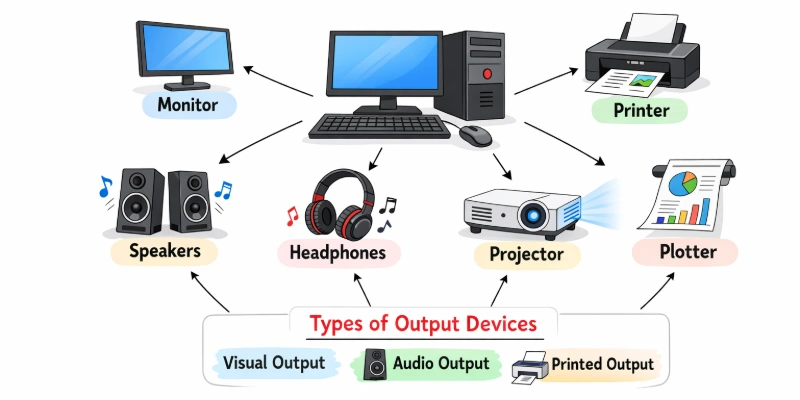
Let’s take a step-by-step look at important output devices.
1. Monitor
A monitor allows users to interact visually with a computer. It acts as the primary interface between the system and the user. Every command you enter appears instantly on the screen. Over time, display technology has improved brightness and energy efficiency. Today, most users prefer flat and lightweight designs for daily tasks.
- High-resolution display support
- Adjustable brightness and contrast
- Multiple input port options
- Slim and space-saving design
Example:
When you edit a photo, the monitor presents colors and details so you can adjust them accurately.
2. Printer
A printer converts digital content into printed material. It helps people keep official records and important documents. Offices depend on it for contracts and invoices. Students use it to prepare academic work. Over the years, printing technology has become more reliable. A dependable printer supports smooth and consistent output.
- High-speed page processing
- Multiple connectivity support options
- Compact body for desks
- Large paper tray capacity
Example:
When a teacher prepares exam papers, the printer produces multiple copies for the entire class.
3. Speaker
A speaker converts digital signals into audible output. It plays an important role in communication and entertainment. People rely on it during virtual meetings and media playback. Over time, audio devices have become more energy efficient. Many users prefer external units for stronger performance. A reliable speaker enhances digital interaction.
- Wide frequency range support
- External power source option
- Durable outer body material
- Multiple input port compatibility
Example:
During a video conference, the speaker delivers the participant’s voice clearly to everyone in the room.
4. Projector
A projector transfers visual content from a device onto a flat surface. It helps instructors and professionals share information with many people at once. This tool supports structured communication in educational and corporate settings. Users rely on it when they need a wider viewing area. Over time, projection technology has improved reliability. A dependable projector supports smooth public presentations.
- High lumen brightness output
- Adjustable focus control system
- Multiple input port compatibility
- Portable, lightweight body design
Example:
In a training session, the trainer connects a laptop to the projector so participants can view the charts clearly.
2. Advanced Output Devices
Some output devices go beyond the basics and offer specialized features for modern tasks. They handle complex work, produce high-quality results, and make creative or technical jobs easier. Learning about these advanced devices helps you understand how technology can do more than simple printing or displaying.
Let’s explore the important output devices today.
- 3D Printer
- VR Headset
- Multifunction Device
- Touchscreen Display
Let’s take a detailed look at the key output devices
1. 3D Printer
A 3D printer creates physical objects directly from digital designs. Designers, engineers, and hobbyists use it to make models and prototypes fast. Many industries rely on it for testing and early-stage production.
Modern machines can produce intricate shapes with consistent results. Using a 3D printer opens new opportunities for creative projects and innovation. These printers also reduce material waste compared to traditional methods.
- Compatible with various material types
- Produces highly detailed components
- Enables quick design iterations
- Supports complex shape creation
Example:
An engineer prints a prototype smartphone case to test its fit and design before large-scale manufacturing.
2. VR Headset
A VR headset transports users into a digital world using advanced display and sound technology. It allows people to interact with games, training programs, and simulations realistically. Businesses, schools, and designers use it to improve learning and creativity.
Modern headsets support precise movement and accurate spatial representation. They help explore experiences that are difficult or impossible in real life. Using VR technology can make tasks engaging and educational.
- Adjustable lenses for clear vision
- Comfortable head strap design
- Wide field of view support
- Easy connection with devices
Example:
A medical student practices surgical procedures in a simulated environment using a VR headset before working on real patients.
3. Multifunction Device
A multifunction device combines several tools into a single unit for convenience. Offices and homes rely on it to manage documents efficiently. Modern models offer faster performance and high-quality results for daily tasks.
They reduce the need for multiple machines, saving space and costs. Users can complete several operations without switching devices. A reliable multifunction device simplifies workflows and boosts productivity.
- Compact and space-saving design
- Supports network and wireless printing
- Handles high-volume workloads easily
- Easy maintenance and setup process
Example:
A small business uses a multifunction device to manage printing, scanning, and copying tasks all from one machine.
4. Touchscreen Display
Interacting with devices becomes natural using a touchscreen display. It responds instantly to finger taps or a stylus, making navigation smoother. Many tablets, smartphones, and interactive monitors rely on this technology for everyday tasks.
Visuals appear sharp, and colors remain vibrant on modern screens. Creative projects, presentations, and interactive applications benefit from its responsive interface. These displays also save space by eliminating the need for separate input tools.
- High-resolution visual output quality
- Supports multi-touch gesture input
- Compatible with various operating systems
- Durable and scratch-resistant surface
Example:
A designer sketches directly on a touchscreen display, adjusting shapes and colors in real time for a digital illustration.
3. Specialized/Optical/Accessibility Devices
Some output devices are designed for special purposes, unique tasks, or accessibility needs. They go beyond common and advanced devices, helping professionals and individuals achieve precise, efficient, or inclusive results. Exploring these devices shows how technology adapts to different requirements and environments.
Here are the main specialized output devices to know.
- Plotter
- LED/LCD Panels
- Braille Display
- Headphones / Earphones
Let’s take a closer look at each specialized and accessibility output device.
1. Plotter
Plotters produce detailed diagrams and layouts from digital designs, perfect for technical projects. Engineers and architects use them to create accurate maps, plans, and blueprints. Modern plotters handle different paper sizes and materials efficiently.
They deliver consistent, high-quality output even for complex drawings. Professionals rely on plotters to save time while maintaining precision. These devices ensure that every technical drawing remains clear and professional.
- High-speed output for complex projects
- Handles multiple paper types efficiently
- Produces extremely detailed drawings
- Compact design for office use
Example:
An architect prints a full-scale building blueprint on a plotter to review the design with clients.
2. LED/LCD Panels
Large LED and LCD panels show digital content clearly to groups of people. Airports, classrooms, and offices use them to communicate information instantly. Modern screens produce sharp images and vivid colors for better visibility.
Many models allow mounting on walls or placing on stands for convenience. These displays support presentations, dashboards, and public announcements efficiently. Using LED or LCD panels ensures messages reach audiences effectively.
- Wide viewing angles supported
- Energy-efficient display technology
- High contrast and brightness levels
- Durable and long-lasting design
Example:
A conference center uses an LCD panel to show schedules, speaker information, and live updates to attendees.
3. Braille Display
Visually impaired users can read digital content with a Braille display through tactile feedback. Small pins move up and down to represent text in Braille characters. Students and professionals rely on these devices to interact with computers, tablets, and smartphones independently.
Lightweight and portable models make carrying and setup simple. Adjustable settings allow users to control reading speed for comfort. These devices promote accessibility and empower users in education and work environments.
- Converts text into tactile Braille
- Lightweight and easy to carry
- Supports multiple device connections
- Customizable reading speed options
Example:
A student reads digital textbooks using a Braille display, completing assignments independently without assistance.
4. Headphones / Earphones
Audio can be delivered directly to users using headphones or earphones, allowing private listening. People rely on them for music, online classes, gaming, and virtual meetings. Compact designs make them easy to carry during travel or daily activities.
Some models include advanced features for immersive sound experiences. These devices help users stay focused without disturbing others nearby. Headphones and earphones improve both learning and entertainment conveniently.
- Compatible with multiple devices easily
- Ergonomic and comfortable fit design
- Adjustable volume and sound control
- Durable construction for long use
Example:
A student listens to an online lecture using headphones, concentrating on the material without any distractions.
How Output Devices Are Used in Daily Life
Output devices connect digital systems with the real world. They present processed information in a form people can easily understand. Users depend on them to receive results in visual, printed, or audio form. These tools make computer operations meaningful and practical. Modern environments rely on them to share information quickly and clearly.
- Education & Training: Instructors display visual lessons, diagrams, and presentations to improve student understanding during classroom sessions.
- Corporate Tasks: Staff review performance data, generate printed documents, and conduct presentations using digital display equipment.
- Home Entertainment: Viewers stream films on large screens and enjoy immersive audio through advanced sound systems.
- Medical Facilities: Specialists examine diagnostic images and clinical reports on high-definition monitors for accurate evaluation.
- Financial Services: Banking machines present account information and issue transaction slips immediately after each request.
- Retail Operations: Checkout systems produce purchase receipts and show billing details on customer-facing displays.
- Transportation Hubs: Terminals present travel schedules, boarding updates, and service announcements on electronic boards.
Conclusion
In this guide, we have covered types of output devices. We explored how different devices help users receive information from computers in visual, audio, and printed forms. Understanding the types of output devices makes it easier to choose the right tool for your needs.
I personally recommend comparing features, quality, and purpose before making a final decision. Choosing wisely will help you get better performance and long-term value.
Thank you very much for reading this guide. Don’t skip the next part of the FAQs. I hope you will find something more interesting, so don’t miss it. If you miss it, you may lose something new.
FAQS: Types of Output Devices
Now, let’s answer some common and important questions about types of output devices to clear any confusion you may still have.
Output devices are hardware that show information from a computer. They convert digital data into a form humans can understand. Common examples include monitors, printers, and speakers. Without output devices, users cannot see or hear the computer’s results.
The main function is to present processed data to the user. This can be in visual, printed, or audio form. Output devices make it easier to understand and use computer information. They help in education, work, entertainment, and communication.
Speakers and earphones convert digital audio signals into sound. They allow users to hear music, notifications, or computer-generated audio. Headphones and earphones are personal output devices, while a group can share speakers. They enhance learning, communication, and entertainment experiences.
Advanced output devices include 3D printers, VR headsets, and multifunction devices. They go beyond basic monitors or printers. These devices are used in creative work, gaming, professional design, and immersive experiences. Advanced devices offer interactive and specialized output capabilities.
A 3D printer creates physical objects from digital designs. It is an advanced output device used in engineering, medical, and creative industries. Users can make prototypes, models, or customized items. 3D printing saves time and allows precise fabrication.
A Braille display converts text into tactile output for visually impaired users. It is a specialized accessibility device. Users can read digital content independently using the moving pins. It promotes learning and accessibility to work for all.
Printers, monitors, and projectors assist in presentations, reports, and document sharing. They make workflow faster and communication clearer. Specialized devices like multifunction machines save space and improve efficiency. Offices rely on output devices for smooth daily operations.
Some output devices may be expensive or require maintenance. Others can consume high energy or have limited compatibility. Overusing devices like speakers can affect health. Managing risks includes proper handling, regular servicing, and choosing reliable brands.



- Be Respectful
- Stay Relevant
- Stay Positive
- True Feedback
- Encourage Discussion
- Avoid Spamming
- No Fake News
- Don't Copy-Paste
- No Personal Attacks
- Be Respectful
- Stay Relevant
- Stay Positive
- True Feedback
- Encourage Discussion
- Avoid Spamming
- No Fake News
- Don't Copy-Paste
- No Personal Attacks
