Characteristics of the Computers Complete Beginner’s Guide
Published: 21 Feb 2026
Many people feel confused about why a computer never gets tired, never forgets data, and never makes mistakes in repetitive tasks. This is not magic. It happens because of the characteristics of the computers.
These built-in qualities make computers fast, accurate, and reliable in every field today. I have worked closely with computer systems and guided many beginners, and I have seen how understanding these characteristics removes confusion immediately.
In this article, we have covered the core characteristics of the computer in simple language so you can clearly understand how and why a computer performs better than humans in many tasks.
What Are Characteristics of Computers?
Computers make life easier by handling tasks efficiently and managing information for users. They help offices, schools, and homes save time and reduce mistakes.
Beginners who understand how computers work can see why these machines are so reliable and helpful. Each function plays a special role in improving productivity and accuracy.
- Handles complex operations efficiently
- Supports long-term data management
- Runs several programs simultaneously
- Provides consistent output without errors
- Automates routine operations independently
Characteristics of the Computers Step By Step
Computers are amazing tools that can do things we often take for granted. Step by step, they handle tasks that would take humans hours to complete. Once you see how each function works, you start to understand why computers are so powerful and reliable.
Here is the list of characteristics of the computers.
- Speed
- Accuracy
- Automation
- Works without getting tired
- Storage capacity
- Versatility
- Multitasking
- Reliability
- Connectivity
- Limitations
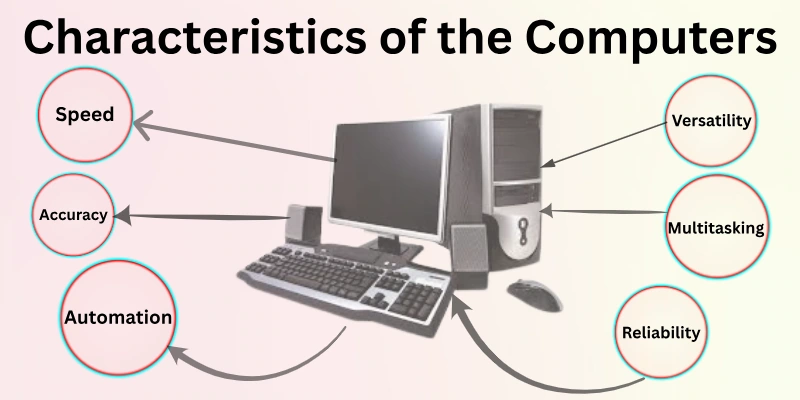
Let’s take a closer look at each point.
1. Speed
At an online shopping website, computers process thousands of orders in seconds, ensuring customers receive instant confirmations. This incredible speed helps e-commerce platforms manage huge amounts of data during sales and promotions.
Speed also enables scientists to run simulations quickly and complete complex calculations in a fraction of the time it takes humans to do so. Daily use of search engines, video streaming, and cloud services depends heavily on fast processing. Observing these tasks shows why speed is a defining quality of computers. For beginners, understanding speed demonstrates how computers make life faster and more efficient.
- Handles millions of instructions per second
- Reduces waiting time for users
- Performs tasks in real-time
- Supports large workloads efficiently
Example:
A weather forecasting system predicts storms in seconds.
2. Accuracy
In a hospital, computers calculate medicine doses for hundreds of patients without error. They help doctors ensure prescriptions are correct and reduce human mistakes during critical care. Accuracy is vital for lab results, billing, and patient records, where even a small error can have serious consequences.
Every day use in banks, schools, and laboratories relies on computers maintaining this precision consistently. Observing these tasks shows why exact results are essential for trust and reliability. Beginners quickly learn that accuracy is one of the most important qualities in every computer.
- Minimizes mistakes in calculations
- Produces reliable daily outputs
- Maintains consistent patient records
- Ensures correct financial transactions
Example:
An online exam platform instantly scores thousands of tests.
3. Automation
In a manufacturing plant, robotic arms controlled by computers assemble products without human supervision. They perform the same tasks repeatedly without slowing down or making mistakes. Automation allows companies to save time, reduce manual labor, and increase overall efficiency.
Daily operations like factory production, warehouse management, and logistics benefit from continuous automated work. Watching these systems operate independently shows how computers streamline complex workflows. Beginners can see how automation transforms repetitive tasks into smooth, effortless processes.
- Performs repetitive work automatically
- Eliminates the need for manual effort
- Runs operations continuously without pause
- Streamlines workflow efficiently
Example:
A smart irrigation system waters fields automatically at night.
4. Works Without Getting Tired
In a research lab, computers run complex simulations continuously for hours without slowing down, while humans would need breaks and rest. This ability allows scientists to analyze huge datasets and model experiments efficiently.
Unlike humans, computers do not experience fatigue, which makes them reliable for long-term projects. In offices, schools, and hospitals, computers maintain performance consistently even during heavy workloads. Observing this shows how machines handle demanding tasks seamlessly. Beginners quickly notice that this tireless nature is a key advantage of computers.
- Functions nonstop for long periods
- Maintains stable output consistently
- Handles extended operations easily
- Supports demanding tasks tirelessly
Example:
A server runs online courses for thousands of students continuously.
5. Storage Capacity
A library’s digital system can store thousands of books, journals, and records on a single computer, something impossible manually. Storage capacity allows businesses, schools, and hospitals to keep important data safe and accessible. Computers can hold large multimedia files, documents, and databases without losing information.
This ability helps users retrieve data instantly whenever needed. Watching a computer handle massive storage efficiently demonstrates why it is critical in daily operations. Beginners can see how storage capacity makes computers indispensable tools for work and learning.
- Holds large files and databases
- Keeps documents safely accessible
- Stores multimedia efficiently
- Supports massive data operations
Example:
A video editing system stores hundreds of hours of raw footage.
6. Versatility
At home, a computer can handle writing documents, browsing the internet, playing games, and video conferencing all on the same machine. This versatility allows a single device to serve multiple purposes, making it highly useful for students, professionals, and families.
Computers adapt easily to new software and tasks, handling work that once required several different tools. Observing this daily shows how versatile machines have become in modern life. Beginners quickly understand that versatility makes computers suitable for almost any task.
- Performs multiple roles effortlessly
- Adapts to diverse software quickly
- Supports both work and leisure
- Fits various user requirements
Example:
A single laptop runs coding, design, and video streaming simultaneously.
7. Multitasking
Professionals rely on computers to run spreadsheets, email clients, and communication apps simultaneously. Humans would struggle to manage so many tasks at once. Multitasking allows users to complete more work in less time.
From research to creative projects, computers handle multiple programs flawlessly. Observing this demonstrates why multitasking is a major advantage. Beginners quickly recognize how it boosts productivity and efficiency.
- Runs several programs concurrently
- Manages multiple applications efficiently
- Handles simultaneous tasks smoothly
- Boosts productivity for users
Example:
A designer edits a video while running animation software.
8. Reliability
Banks and hospitals depend on computers to store and manage data without errors. Reliable performance ensures that critical operations run smoothly every day. Computers consistently execute programmed tasks without failure.
This dependability builds trust for high-stakes work. Observing reliable systems demonstrates their importance in professional and personal contexts. Beginners learn why reliability is a cornerstone of modern computing.
- Executes tasks without interruption
- Delivers consistent performance daily
- Keeps important data safe
- Ensures dependable operation always
Example:
A library system keeps thousands of books available online without errors.
9. Connectivity
Modern computers connect to networks, printers, and other devices seamlessly. Connectivity allows fast data sharing, online communication, and collaborative work. Networks rely on connected computers to complete tasks efficiently.
Observing how devices interact shows the benefits of integrated systems. Beginners quickly notice how connectivity enhances teamwork and productivity. Computers enable smooth interaction across multiple platforms and applications.
- Links devices across networks easily
- Enables fast data transfer
- Supports online collaboration tools
- Connects multiple systems seamlessly
Example:
A student submits assignments instantly via cloud storage.
10. Limitations
Despite their power, computers cannot think, feel, or make decisions independently. They only follow the instructions given by humans. Limitations include dependency on correct input, software instructions, and power supply.
Observing errors caused by wrong input highlights their constraints. Beginners quickly understand the importance of human supervision. Recognizing these limits helps users plan tasks effectively and avoid mistakes.
- Cannot operate independently without input
- Depends on the correct human instructions
- Requires electricity to function
- Limited to programmed capabilities
Example:
A computer cannot judge which email is urgent without human rules.
Common Challenges Faced by Computers
Computers have transformed the way we live and work, but they are not without challenges. Even the most advanced systems can face issues that affect performance and usability. Understanding these challenges helps users prevent problems and maintain smooth operations.
Being aware of common computer difficulties allows beginners and professionals alike to use machines more effectively.
- Hardware failures: Components like hard drives, RAM, or motherboards can malfunction, causing slow performance or complete system shutdowns.
- Software bugs: Programs can crash, freeze, or behave unpredictably, disrupting important tasks and workflows.
- Security threats: Viruses, malware, and phishing attacks can steal data, damage files, or compromise privacy.
- Network issues: Poor connectivity, server downtime, or slow internet can prevent online work and communication.
- Overheating problems: Continuous heavy usage without proper cooling can damage hardware and reduce lifespan.
- Data loss risks: Accidental deletion, corruption, or system crashes can lead to permanent loss of important files.
- Compatibility conflicts: New software or devices may not work correctly with existing systems, causing errors or delays.
Conclusion
In this guide, we have covered the characteristics of the computers. I encourage you to explore how these traits affect your everyday computing, whether for school, office, or personal use. Paying attention to reliability and multitasking can save you time and improve productivity.
I sincerely appreciate your time in reading this, and I wish you all the best in using computers effectively. Don’t skip the next part of the FAQs. I hope you will find something more interesting, so don’t miss it. If you miss it, you may lose something new.
FAQS: characteristics of the computers
Now that you clearly understand the characteristics of the computers, let’s answer some common questions that many people usually ask.
Accuracy ensures that computers produce error-free results consistently. It is vital in areas like finance, medical labs, and online transactions. Even small mistakes can cause major problems, so accuracy builds trust in computer systems. Beginners can rely on computers to handle calculations and data processing precisely.
Speed allows computers to process millions of instructions per second. Faster processing improves productivity and reduces waiting time. Tasks like gaming, video editing, and online research benefit from high-speed computers. Speed is a key reason why computers are preferred for both work and study.
Reliability ensures that computers perform tasks consistently without failure. It is crucial in hospitals, banks, and research labs. Reliable systems prevent data loss and operational delays. Beginners can trust computers to work dependably in everyday tasks.
Storage capacity determines how much data a computer can hold. Computers with higher storage can save documents, multimedia, and databases efficiently. Adequate storage prevents slowdowns and keeps files accessible. This is an essential characteristic for students, professionals, and businesses.
Versatility allows computers to handle different tasks using the same device. A computer can be used for gaming, designing, coding, and online learning. This saves users from buying multiple devices. Versatility makes computers suitable for personal, educational, and professional use.
Computers face security threats like viruses, malware, and hacking attacks. These can steal or corrupt important data. Using antivirus software and safe browsing habits protects your system. Beginners must understand basic cybersecurity to maintain computer safety.
Hardware challenges include hard drive failure, overheating, or RAM issues. These can slow down systems or cause crashes. Regular maintenance and monitoring help prevent problems. Understanding hardware limits helps beginners protect their computers.
Yes, beginners can leverage characteristics like speed, accuracy, and connectivity. Learning basic computer skills and safe usage ensures efficiency. Gradually exploring features like multitasking and storage improves productivity. Understanding these traits allows beginners to maximize computer benefits.
Networking connects computers to share resources and access the internet. It enables collaborative work, file sharing, and online communication. Networking is critical in offices, schools, and research environments. Beginners can perform tasks more efficiently using networked systems.
Overheating can slow down or damage computer hardware. Continuous heavy usage without proper cooling causes system failures. Monitoring temperature and using cooling systems keeps computers safe. Beginners should avoid blocking vents or overloading tasks to maintain performance.



- Be Respectful
- Stay Relevant
- Stay Positive
- True Feedback
- Encourage Discussion
- Avoid Spamming
- No Fake News
- Don't Copy-Paste
- No Personal Attacks
- Be Respectful
- Stay Relevant
- Stay Positive
- True Feedback
- Encourage Discussion
- Avoid Spamming
- No Fake News
- Don't Copy-Paste
- No Personal Attacks
