Advantages and Disadvantages of Output Devices Best Guide
Published: 1 Mar 2026
Why does a printed page look different from what appears on your screen, even though both come from the same computer? Many people get confused because they do not understand the advantages and disadvantages of output devices.
I remember helping a friend who printed dozens of test pages before he learned how his printer settings affected the results. Once you understand how these devices behave, you make better decisions every time you use your system.
In this article, we have covered the key pros and cons in simple words so you can avoid common mistakes and use your devices with confidence. This knowledge makes using computers much easier and more reliable.
Now let’s dive into the article and explore the details step by step.
Advantages and Disadvantages of Output devices Step By Step
Every output device brings both benefits and limitations that many users ignore. You may enjoy clear visuals on your monitor, but you might also face issues like high cost or maintenance. When you understand the strengths and weaknesses of each device, you make smarter decisions. Let’s break everything down simply and practically.
Now let’s look at the devices one by one.
- Monitor
- Printer
- Speakers
- Headphones
- Projector
- Plotter
- Braille Display
- 3D Printer
- VR Headset
- Multifunction Device
- LED and LCD Panels
Now let’s examine the advantages and disadvantages of each device in detail.
Monitor
A monitor acts as the main visual screen of a computer. It shows the results of every command you give. You rely on it to view websites, software, and creative projects. Modern models offer better brightness and smoother motion.
Uses
- Read documents and online content
- Watch movies and tutorials
- Create digital art and designs
- Enjoy interactive gaming sessions
Tip: Position your monitor at eye level and adjust brightness for comfortable viewing.
Advantages
- Produces vibrant color output
- Reduces mistakes during tasks
- Offers large viewing sizes
- Connects easily with hardware
Tip: Choose a high-resolution monitor to enhance clarity and improve work accuracy.
Disadvantages
- Requires a continuous power supply
- May strain eyes over time
- Needs proper desk placement
- Advanced models cost more
Tip: Take regular breaks and maintain a proper distance to prevent eye fatigue.
Printer
A printer converts digital content into physical copies you can hold and share. People use it in homes, offices, and schools to create important documents and visuals. Modern printers include inkjet, laser, and multifunction models for different tasks. Knowing how each type works helps you save time and avoid common issues. Using printers effectively improves both productivity and output quality.
Uses
- Produce reports and official documents
- Print high-quality photos and images
- Scan and copy files easily
- Prepare assignments and handouts
Tip: Keep printer heads clean to maintain smooth, clear prints.
Advantages
- Provides tangible copies instantly
- Supports both color and black
- Simple to connect and operate
- Enhances professional and personal work
Tip: Use fast printers to save time on large tasks.
Disadvantages
- Requires regular ink or toner
- Uses paper and other supplies
- Needs desk space and setup
- Slower for bulk printing jobs
Tip: Stock extra ink and paper to avoid interruptions.
Speakers
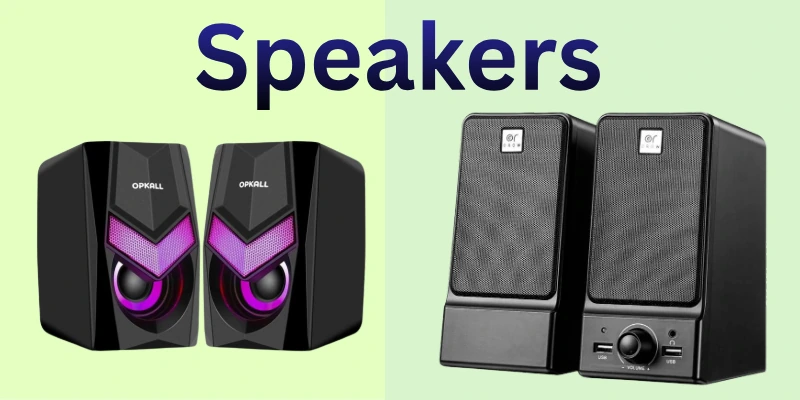
Speakers let you hear sounds from your computer or other devices clearly. They are essential for music, movies, games, and video calls. Modern speakers offer crisp audio, bass control, and stereo effects for a better experience. Understanding their benefits and limitations helps you choose the right type for home or work. Using speakers properly improves both entertainment and communication quality.
Uses
- Listen to music and podcasts
- Enhance movie and video audio
- Participate in online meetings
- Support gaming sound effects
Tip: Place speakers at ear level for best sound clarity
Advantages
- Deliver clear and rich audio
- Improve the entertainment and learning experience
- Connect easily with devices
- Enhance communication in calls
Tip: Adjust volume and bass to protect hearing and improve clarity.
Disadvantages
- Can occupy desk or floor space
- Quality varies with price range
- Require electrical power to function
- May produce sound distortions at high volume
Tip: Keep speakers away from walls to reduce echo and distortion.
Headphones
Headphones let you listen to audio privately without disturbing others. They are popular for music, online classes, gaming, and video calls. Modern headphones offer clear sound, noise cancellation, and comfortable designs for long use.
Choosing the right type helps you enjoy better sound quality and protects your hearing. Understanding their strengths and weaknesses ensures you get the best experience for work or entertainment. Using headphones correctly improves focus and prevents distractions.
Uses
- Listen to music or podcasts privately
- Participate in online meetings or classes
- Enjoy immersive gaming sessions
- Watch videos without disturbing others
Tip: Use a comfortable fit and moderate volume for long sessions.
Advantages
- Provide clear and focused audio
- Reduce background noise effectively
- Portable for home or travel
- Support multiple device connections
Tip: Choose noise-canceling headphones to improve concentration and reduce distractions.
Disadvantages
- Can cause ear fatigue over time
- Requires regular charging of batteries
- Wires or connectivity may tangle
- Higher-quality models are expensive
Tip: Take short breaks during long use to protect hearing and comfort.
Projector
A projector displays images and videos on large screens or walls, making it ideal for presentations and entertainment. It helps groups of people see content clearly in classrooms, offices, or home theaters. Modern projectors offer bright displays, high resolution, and portable designs.
Understanding how projectors work allows you to choose the right one for your needs. Using them correctly improves both visibility and audience engagement. I have seen how a well-set projector can make meetings and movie nights much more enjoyable.
Uses
- Show presentations to large audiences
- Display movies or videos clearly
- Conduct classroom lessons effectively
- Support group gaming or events
Tip: Adjust the distance and focus for sharp images.
Advantages
- Provides large-scale visuals easily
- Enhances audience understanding in presentations
- Portable for different locations
- Works with multiple input devices
Tip: Keep the projector in a dim room for the best brightness.
Disadvantages
- Requires a proper screen or wall
- Can be affected by ambient light
- Needs regular maintenance and cleaning
- Higher resolution models cost more
Tip: Clean the lens regularly to maintain clear projection.
Plotter
A plotter is a device designed to print large, detailed images with precision. Professionals like engineers, architects, and designers use it for technical drawings, schematics, and charts. Unlike standard printers, plotters handle wide formats and complex line patterns accurately.
Modern plotters are reliable, fast, and compatible with most design software. Learning to operate a plotter correctly ensures clean prints and saves time. Proper use also reduces errors and produces professional-quality results consistently.
Uses
- Produce technical drawings and schematics
- Print large charts and diagrams
- Create professional design layouts
- Output complex engineering illustrations
Tip: Always check paper alignment before printing for precise results.
Advantages
- High precision for detailed designs
- Handles wide-format printing efficiently
- Reduces mistakes in complex projects
- Compatible with design software easily
Tip: Use quality materials to improve print clarity and durability.
Disadvantages
- Higher cost than regular printers
- Needs frequent maintenance and care
- Requires a dedicated workspace for operation
- Slower for small, simple jobs
Tip: Keep the device clean to maintain accuracy and prevent streaks.
Braille Display
A Braille display is a special output device designed for visually impaired users. It converts text on a computer or mobile device into raised dots that can be read by touch. These devices help users read documents, emails, and online content independently.
Modern Braille displays are lightweight, portable, and often compatible with multiple devices. Knowing how to use them effectively ensures accessibility and better learning or work experiences. Proper care and handling also extend the device’s lifespan and reliability.
Uses
- Read digital content by touch
- Access emails and documents easily
- Assist in education and learning
- Navigate websites and software efficiently
Tip: Keep the display clean to maintain clear, readable dots.
Advantages
- Provides independent access to information
- Lightweight and portable for travel
- Supports multiple devices seamlessly
- Enhances learning and productivity
Tip: Pair with a screen reader for faster reading and better understanding.
Disadvantages
- Can be expensive for personal use
- Requires regular maintenance and care
- Limited availability compared to standard devices
- Smaller models may display less content
Tip: Store in a safe, dry place to avoid damage and extend lifespan.
3D Printer
3D printers turn digital designs into physical objects, layer by layer. Engineers, designers, and hobbyists use them for prototypes, models, and custom items. These printers handle complex shapes that traditional printers cannot.
They work with plastics, resins, and even metals, allowing innovation across fields. Learning proper operation ensures accurate prints and reduces wasted materials. Using them effectively can save time and bring creative ideas to life.
Uses
- Produce prototypes for testing
- Create custom tools or parts
- Design educational models
- Make artistic or decorative items
Tip: Level the build plate before printing for precision.
Advantages
- Enables rapid prototyping
- Produces complex shapes easily
- Reduces production time
- Works with multiple materials
Tip: Use quality filaments for stronger prints.
Disadvantages
- High-end models are costly
- Requires maintenance and cleaning
- Printing large objects takes time
- Limited material options for some designs
Tip: Keep the printer stable to prevent errors.
VR Headset
Imagine stepping into a world that feels completely real, even though it’s digital. VR headsets make this possible by surrounding users with 360-degree visuals and interactive environments. Gamers explore exciting virtual realms, while students and professionals practice skills in safe simulations.
Comfort and clarity improve when the device is properly adjusted for each user. Lightweight designs and wireless options let people move freely without restrictions. By using VR headsets responsibly, users can enjoy immersive experiences while avoiding discomfort or fatigue.
Uses
- Experience immersive gaming environments
- Conduct realistic training simulations
- Explore educational virtual programs
- Navigate 3D virtual spaces interactively
Tip: Adjust head straps and lenses for comfort and clarity.
Advantages
- Provides realistic, immersive experiences
- Enhances learning and training efficiency
- Portable and wearable design
- Compatible with multiple devices
Tip: Take regular breaks to prevent eye strain and fatigue.
Disadvantages
- May cause motion sickness or dizziness
- High-end models can be expensive
- Requires enough space for safe use
- Needs regular software updates and cleaning
Tip: Store in a cool, dry place to preserve device quality
Multifunction Device
Managing daily office work becomes smoother when one system supports multiple tasks in one place. Instead of switching between different machines, users complete their workflow efficiently with minimal interruption.
This setup improves productivity and keeps the workspace organized. Businesses prefer it because it reduces clutter and simplifies operations. Even home users benefit from faster task handling and easy setup. When maintained properly, it delivers steady performance for long-term use.
Uses
- Prepare office paperwork efficiently
- Digitize records for storage
- Duplicate documents for distribution
- Share paperwork across distances
Tip: Review settings before starting large tasks to avoid errors.
Advantages
- Improves workflow efficiency
- Reduces workspace clutter
- Supports team productivity
- Convenient all-in-one solution
Tip: Schedule regular servicing to maintain smooth performance.
Disadvantages
- A single fault stops operations
- Heavy usage reduces lifespan
- Initial investment can be high
- Repairs may be costly
Tip: Avoid overloading the device during peak hours.
LED and LCD Panels
Modern visual technology has changed how people experience digital screens. LED and LCD panels use advanced lighting systems to produce detailed images with balanced contrast. Their slim structure allows easy installation in homes, offices, and commercial areas.
Many professionals select them for reliable performance and long-term durability. Selecting the right panel type depends on viewing distance and purpose. Careful handling ensures stable brightness and consistent picture quality over time.
Uses
- Operate computer workstations daily
- Monitor security camera systems
- Guide travelers through information boards
- Support creative editing tasks
Tip: Mount the panel securely for stable viewing.
Advantages
- Maintains consistent color accuracy
- Offers lightweight construction
- Supports extended daily usage
- Delivers smooth motion clarity
Tip: Use recommended settings for better performance.
Disadvantages
- Pixels may fail over time
- Backlight issues affect visibility
- Replacement parts can be costly
- Sensitive to physical impact
Tip: Avoid pressing the screen surface.
Importance of Output Devices in Daily Life
Every digital action needs a visible or audible result to make sense to users. Output devices turn processed data into something people can understand and use immediately. Daily routines at home, school, and work rely on these tools to stay organized and informed. They bridge the gap between computer systems and human interaction. Because of them, technology feels practical rather than complicated.
Here’s how output devices support everyday life.
- Improved Productivity: Employees complete their daily tasks faster and more accurately because screens and printers provide instant results and feedback.
- Enhanced Education: Students understand lessons better when interactive displays and audio systems present content clearly and engagingly.
- Efficient Collaboration: Teams discuss ideas and make decisions quickly using shared visuals and real-time presentations during meetings.
- Accessible Information: Public display systems effectively share schedules, updates, alerts, and notifications in crowded or busy locations.
- Creative Development: Artists and editors refine their projects accurately with high-quality monitors and displays that show precise details.
- Home Convenience: Televisions and smart displays simplify entertainment, news, and daily planning for all household members.
- Customer Engagement: Businesses attract attention and deliver promotional or informational content effectively using modern digital signage.
- Inclusive Support: Assistive output tools help individuals with disabilities access digital services and educational resources independently.
Conclusion
In this guide, we have covered the advantages and disadvantages of output devices. We explored how these tools support productivity and entertainment while also identifying their possible drawbacks. Understanding both sides helps us make smarter decisions when selecting and using devices.
Instead of ignoring the limitations, we should manage them through proper care, smart budgeting, and safe usage habits. When we balance benefits with responsibility, output devices become more effective and reliable in daily life. It has been a pleasure guiding you through this topic.
Don’t skip the next part of the FAQs. I hope you will find something more interesting, so don’t miss it. If you miss it, you may lose something new.
FAQS: Advantages and Disadvantages of Output Devices
Now, let’s answer the most common questions related to the advantages and disadvantages of output devices.
The advantages and disadvantages of output devices depend on their purpose and quality. They help users view, hear, or print processed data clearly. However, they may require maintenance, electricity, or extra cost. Understanding both sides helps users choose the right device.
Soft copy output refers to digital information displayed on a screen, such as text, images, or videos. Hard-copy output produces printed documents on paper or other materials. Monitors and projectors create soft copies, while printers and plotters produce hard copies. Both forms are important depending on the purpose of use.
A monitor displays instant visual results from the computer. It allows users to edit documents, watch videos, and design graphics efficiently. Modern LED and LCD monitors offer high resolution and color accuracy. However, prolonged screen use may cause eye strain if not managed properly.
Output devices provide immediate feedback and clear results. Employees can analyze reports, print documents, and present data quickly. Visual clarity reduces errors in professional tasks. This improves efficiency and saves time in offices.
Projectors display large visuals for classrooms and seminars. Students understand lessons better through images and presentations. Teachers can explain complex topics more clearly. However, lighting conditions may affect projection quality.
Output devices help share information visually and audibly. Monitors display text and graphics clearly. Speakers transmit voice during calls and conferences. These tools improve both personal and professional communication.
Speakers convert digital signals into clear audio output. They improve communication during meetings and online classes. Good sound quality enhances entertainment experiences. Poor-quality speakers, however, may distort audio.
We can manage disadvantages by maintaining devices regularly. Adjusting settings reduces health risks. Choosing energy-efficient models lowers electricity use. Smart usage balances the advantages and disadvantages of output devices effectively.

- Be Respectful
- Stay Relevant
- Stay Positive
- True Feedback
- Encourage Discussion
- Avoid Spamming
- No Fake News
- Don't Copy-Paste
- No Personal Attacks
- Be Respectful
- Stay Relevant
- Stay Positive
- True Feedback
- Encourage Discussion
- Avoid Spamming
- No Fake News
- Don't Copy-Paste
- No Personal Attacks
