What Is An Output Device in Computer Proven Guide for Success
Published: 27 Feb 2026
Many beginners feel confused when the computer shows results on the screen or prints documents on paper. They often try to understand how the computer presents the final result of their work. So what is an output device?
It is hardware that sends processed data from the computer to the user in a form you can see, hear, or use. Devices like monitors, printers, and speakers make daily tasks easier at home, school, and offices. I have taught this topic to many students, and I know that once they understand this concept, their confusion disappears.
In this article, we have covered what is an output device in computer in simple and clear words so you can understand it easily.
Stay with me as we explore the clear definition of an output device and see how it works inside a computer system.
Definition of What Is an Output Device
An output device is a hardware component that allows a computer to communicate information to the user. It converts processed data into a format humans can understand, such as visuals, sounds, or printed text.
Output devices make it easier to see results, hear alerts, or create physical copies of digital information. They are essential for interacting effectively with computers and completing tasks efficiently. Every computer system relies on output devices to present its results clearly.
- Shows information on a screen
- Prints documents and images
- Produces sound and alerts
- Displays videos and graphics
- Transfers data to external devices
History of Output Devices
Output devices have changed greatly over time as technology has improved. Early computers used very simple methods to present results to users. As machines became more powerful, developers introduced better ways to display text, images, and sound. Today, modern output devices provide fast, clear, and high-quality results for different needs.
- 1940s Print Outputs: Early computers used basic printers and punched cards to produce numerical results on paper for record keeping.
- 1950s Line Printers: Large line printers printed complete rows of text quickly, helping businesses generate reports efficiently.
- 1960s Cathode Ray Tubes: Engineers introduced CRT monitors that displayed text and simple graphics directly on screens.
- 1970s Dot Matrix Printers: Manufacturers developed impact printers that created characters using small pins striking ink ribbons.
- 1980s Personal Monitors: Home computers used color monitors to show clearer text and basic graphical interfaces.
- 1990s Inkjet Technology: Companies launched inkjet printers that produced high-quality images and detailed documents at a lower cost.
- 2000s LCD Displays: Flat-panel screens replaced bulky monitors and offered brighter visuals with reduced power usage.
- 2010s Smart Displays: Modern devices integrated touchscreens, high-definition visuals, and wireless connectivity for advanced interaction.
How Output Devices Work
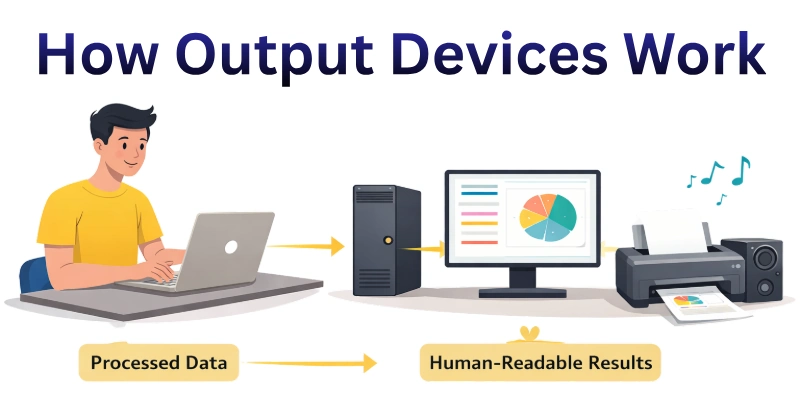
Output devices take the information processed by a computer and convert it into forms humans can easily understand. They send data as visuals, sounds, or printed materials so users can see or hear results instantly. Each device interprets digital signals in its own way to produce the correct output efficiently. They play a key role in making computer interactions clear and practical.
- Receive Data: Accepts information from the computer’s processor and prepares it for output by interpreting the raw digital signals accurately.
- Interpret Signals: Translates complex binary or digital codes into formats that humans can easily see, hear, or read without confusion.
- Generate Visuals: Creates images, text, charts, and graphics on monitors or screens to make information understandable and user-friendly.
- Produce Sound: Converts digital audio data into clear sound through speakers or headphones, including notifications, music, or alerts.
- Print Documents: Transfers digital text, images, or graphics onto paper or other physical media while maintaining quality and precision
- Refresh Continuously: Updates the display or screen in real-time to reflect any changes or dynamic content immediately for smooth interaction.
- Adjust Settings: Modifies output parameters like brightness, contrast, volume, and layout to suit user needs and improve clarity.
- Send Feedback: Communicates the completion of tasks, error messages, or status updates to the user, ensuring they know the system’s response.
Types of Output Devices
Output devices are essential tools that allow computers to present processed information in a form users can understand. They help convert digital data into visuals, sounds, or physical formats for practical use.
Different types of output devices serve different purposes, depending on how information needs to be displayed or delivered. Understanding these types helps users choose the right device for specific tasks efficiently.
Here are the main types of output devices.
- Monitors and Screens: Display text, images, and graphics clearly for easy viewing
- Printers and Plotters: Produce physical copies of documents, images, and charts accurately
- Speakers and Headphones: Deliver sound output, music, alerts, and notifications
- Projectors and Displays: Show presentations, videos, or visuals for group viewing
- LED and LCD Panels: Provide high-resolution visuals with adjustable brightness and contrast
- Braille Terminals: Convert digital text into tactile feedback for visually impaired users
- Multifunction Devices: Combine printing, scanning, and output tasks in one device
- Haptic Devices: Provide physical feedback or vibrations for better interaction.
Advantages of Output Devices
Output devices make it easier for users to understand and use the information processed by computers. They present data in clear visual, audio, or physical formats, which improves productivity and efficiency.
By showing results instantly, they help users make decisions quickly and accurately. Output devices also enhance communication by presenting information in a format everyone can understand. They are essential for completing tasks effectively in both personal and professional settings.
- Show information clearly in readable formats.
- Improve work efficiency and speed tasks.
- Enhance decision-making with quick results.
- Support communication in understandable ways
- Provide user feedback about system status
Disadvantages of Output Devices
Output devices can create challenges in certain situations. Some models take up a large space, which makes placement difficult in small areas. Hardware issues may reduce output quality and affect user experience. Fast-changing technology can make devices outdated quickly. Users may also need basic technical knowledge to operate some advanced equipment properly.
- Occupy a large physical space.
- Reduce quality during malfunctions.
- Become outdated very quickly.
- Requires technical knowledge to operate
- Limit portability in some cases
Output Devices vs Input Devices
Computers rely on both input and output devices to communicate with users. Input devices allow users to enter data and commands, while output devices present the processed results. Together, they ensure smooth interaction between the user and the system.
Here is a simple comparison between input and output devices.
| Feature | Input Devices | Output Devices |
| Basic Role | Enter data into the system | Present results to users |
| Data Flow | Send information inward | Send information outward |
| User Action | Detect typing, clicking, scanning | Display visuals or produce sound |
| Hardware Examples | Keyboard, mouse, microphone | Monitor, printer, speakers |
| Function in Cycle | Begin processing tasks | Complete processing tasks |
| Signal Handling | Convert actions into digital form | Change digital data into a readable form |
| Physical Output | Do not create direct output | Produce visible, audio, or printed output |
Examples and Use Cases of Output Devices
Output devices help users see, hear, or receive the results of computer processes in practical ways. They are used in homes, offices, schools, and industries to make information understandable and actionable. Each type of output device serves a specific purpose, depending on how data needs to be presented. Understanding these examples and their use cases helps users choose the right device for their needs.
- Monitors and Screens: Display text, graphics, and videos clearly for home and office work, gaming, and learning.
- Printers and Plotters: Produce documents, charts, and designs for schools, businesses, and engineering projects.
- Speakers and Headphones: Deliver sound, alerts, and music for entertainment, communication, and notifications.
- Projectors and Displays: Show presentations, lectures, or videos for classrooms, meetings, and events.
- LED and LCD Panels: Provide high-quality visuals in control rooms, digital signage, and media centers.
- Braille Terminals: Convert digital text into tactile output for visually impaired users in education and workplaces.
- Multifunction Devices: Combine printing, scanning, and output for offices to increase efficiency and save space.
- Haptic Devices: Offer physical feedback or vibrations in gaming, simulation, and specialized training programs.
conclusion
In this guide, we have covered what is an output device in computer. These devices help us interact with computers efficiently, but they may require attention, space, or cost considerations. By making thoughtful choices and managing devices properly, you can enjoy their benefits while avoiding problems.
I sincerely thank you for spending your time reading this guide, and I hope it was easy to understand. Don’t skip the next part of the FAQs. I hope you will find something more interesting, so don’t miss it. If you miss it, you may lose something new.
FAQS: What Is An Output Device in Computer
Here is a complete guide of FAQs about what is an output device in computer, helping you understand its examples, uses, advantages, and limitations clearly.
An output device in a computer is hardware that shows, prints, or plays the results processed by a computer. It converts digital information into forms humans can understand. Examples include monitors, printers, and speakers.
Output devices are important because they make computer data readable and usable. Without them, users couldn’t see results, hear alerts, or print documents. They improve productivity and communication in personal and professional tasks.
Most output devices need a computer to process and send data. Some smart devices, like certain printers or speakers, can store small amounts of data independently. But generally, they function as part of a computer system.
A monitor displays text, images, and videos processed by the computer. It helps users view content clearly for work, study, or entertainment. Modern monitors may include high-resolution displays or touch screens for better interaction. Many monitors also feature adjustable stands and eye-care technologies for comfortable long-term use.
Audio output devices include speakers, headphones, and sound systems. They allow users to hear music, alerts, or recorded audio from the computer. They are widely used in entertainment, communication, and multimedia work. Many of these devices also support surround sound and high-quality audio for an immersive experience.
Projectors display computer output on large screens or walls. They are used in classrooms, meetings, and presentations. They help share visual content with multiple people simultaneously. Modern projectors also support high-definition images and wireless connections for easier setup.
Haptic devices give physical feedback, like vibrations, when interacting with digital content. They are used in gaming, simulations, and training programs. They allow users to “feel” digital actions physically. These devices enhance realism and improve user engagement in virtual environments.
A multifunction device combines printing, scanning, and sometimes faxing in one machine. It saves space, reduces cost, and increases office productivity. They are widely used in offices and schools. Many small businesses prefer them because they handle multiple tasks efficiently in a single device.
Braille terminals convert text into tactile feedback for visually impaired users. They allow reading and interaction with computer data. These devices support accessibility and inclusive computing. Many educational and workplace programs rely on them to ensure equal opportunities for everyone.
Output devices generally do not affect core computer performance. However, high-resolution monitors or complex 3D output may require powerful graphics cards. Choosing compatible devices ensures smooth operation.


- Be Respectful
- Stay Relevant
- Stay Positive
- True Feedback
- Encourage Discussion
- Avoid Spamming
- No Fake News
- Don't Copy-Paste
- No Personal Attacks
- Be Respectful
- Stay Relevant
- Stay Positive
- True Feedback
- Encourage Discussion
- Avoid Spamming
- No Fake News
- Don't Copy-Paste
- No Personal Attacks
