What is Computer Simple Guide to Improve Skills and Knowledge
Published: 28 Jan 2026
Every day, computers handle huge amounts of information and help people in offices, schools, and homes. I use a computer every day to write, research, and solve problems quickly. They can do complex calculations in seconds, store large amounts of data, and give accurate results without mistakes.
Computers also help us talk to others, shop online, learn new things, and enjoy entertainment. Seeing how we use them every day shows why they are so important. From my experience, understanding what is computer helps anyone see how it supports almost every task in modern life.
Today, computers play a major role in learning, working, and improving our daily lives. In this article, we have covered all the important points you need to know about computers.
Let’s dig into the article and explore computers.
Definition of Computer
A computer is an electronic device that receives, processes, and stores information to help people complete tasks efficiently. It allows users to write documents, study, browse the internet, create presentations, and solve problems quickly.
Computers can handle large amounts of data, perform calculations accurately, and organize information in a way that makes work and learning much easier. By using a computer, people can save time, improve productivity, and manage tasks more effectively in daily life.
History of the Computer
The history of the computer is full of interesting inventions and discoveries that changed the world. From simple counting machines to today’s powerful devices, computers have evolved in amazing ways. Understanding their journey helps us see how technology became an important part of our lives.
Let’s explore how computers developed step by step.
- Early counting devices: Humans used tools like the abacus to perform basic calculations thousands of years ago.
- Mechanical computers: Inventors created machines in the 17th and 18th centuries to automate calculations, like Pascal’s calculator.
- Analytical engine: Charles Babbage designed a machine in the 19th century that could perform complex calculations and store information.
- First electronic computers: In the 1940s, machines like ENIAC used electricity to process data much faster than mechanical devices.
- Microprocessors: The 1970s brought small chips that could act as a computer’s brain, making personal computers possible.
- Modern computers: Today’s computers are fast, portable, and powerful, used in offices, schools, homes, and even pockets.
Main Parts of a Computer
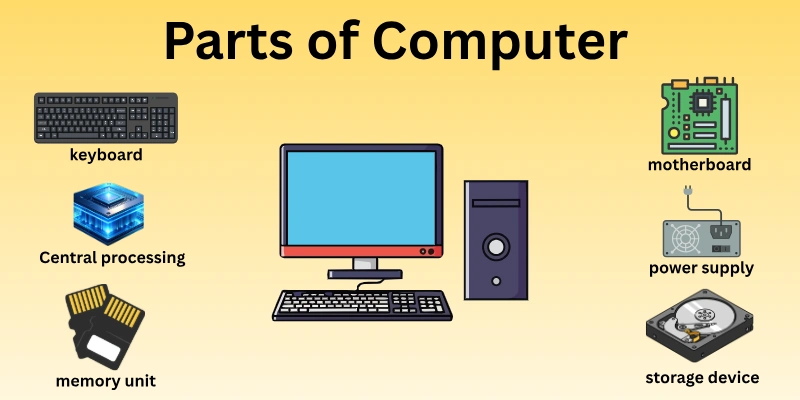
A computer works smoothly because different parts perform specific roles. Each part handles a unique task that helps the system run properly. When these parts work together, the computer becomes fast and reliable. Understanding these components makes computer use easier and more confident.
Here are the important parts of the computer
- Input devices: These parts allow users to enter data and commands into the computer.
- Central processing unit: This part processes instructions and controls all operations inside the system.
- Memory unit: It temporarily stores data and instructions while the computer is working.
- Storage devices: These components save information for long-term use and future access.
- Output devices: They display or produce results after the computer processes data.
- Motherboard: This main board connects all parts and allows them to communicate.
- Power supply: It provides the required electricity to keep the computer running safely.
Types of Computers
Computers come in different forms to meet different needs. Some handle simple daily tasks, while others manage complex work. Each type serves a specific purpose and works in a unique way. Knowing these types helps users choose the right computer for their work.
Let’s learn about the types of computers.
- Desktop computers: Stay in one place and are suitable for office work and home use.
- Laptop computers: Offer portability and support work from different locations.
- Tablet computers: Use touch screens and handle light tasks and media activities.
- Smartphones: Function as small computers for communication and basic applications.
- Workstation computers: Handle advanced tasks like design, editing, and data analysis.
- Supercomputers: Process huge amounts of data for research and complex calculations.
- Embedded computers: Control machines and electronic devices such as cars and appliances.
How Computers Work
Computers may look complex, but their working process follows clear and simple steps. Every task starts with a command and ends with a result. I learned this clearly through daily use and practice. Once you understand the process, using a computer feels easy and logical.
Let’s understand how computers work.
- Input stage: Users enter data and instructions using keyboards, mice, or touch screens.
- Processing stage: Instructions get analyzed, and actions take place step by step.
- Memory usage: Active data stays available while tasks continue.
- Storage function: Files and information are saved safely for later use.
- Output delivery: Results appear on screens, printers, or speakers.
- Control unit: All operations receive direction and proper coordination.
- Continuous cycle: This working process repeats as long as power remains on.
Uses of Computers in Daily Life
Computers have become a natural part of everyday activities. From morning tasks to late-night work, people rely on them in many ways. I see their value daily while managing work and personal needs. Understanding their uses helps us appreciate how much they simplify life.
Let’s explore daily computer use.
- Education support: Students study online, prepare assignments, and access learning resources easily.
- Office work: Professionals create documents, manage data, and communicate efficiently.
- Online communication: People connect through emails, video calls, and social platforms.
- Digital banking: Users pay bills, transfer money, and track accounts securely.
- Entertainment access: Movies, music, games, and reading content stay available anytime.
- Health services: Doctors maintain records and provide guidance using digital systems.
- Online shopping: Customers buy products, compare prices, and place orders quickly.
Pros of Computers
Computers make daily tasks faster and more organized. People use them to manage work, learn new skills, and stay connected. I notice their benefits every day while handling different activities. These advantages show why computers have become essential tools.
Let’s explore the main advantages of computers
- Faster work: Tasks finish quickly with better accuracy and less effort.
- Easy learning: Information stays available through online courses and digital resources.
- Better communication: Messages, calls, and meetings happen without distance barriers.
- Data management: Files are stored safely and remain easy to organize.
- Improved productivity: Time savings allow focus on more important tasks.
Cons of Computers
Computers offer many benefits, but they also bring some challenges. Overuse and poor habits can affect health, focus, and daily routines. I noticed these issues while working long hours on screens. Understanding the drawbacks helps people use computers more wisely.
Let’s look at the main disadvantages.
- Health issues: Long screen time affects eyes, posture, and overall comfort.
- Data risks: Personal information is vulnerable to threats such as hacking and misuse.
- Addiction problems: Excessive use reduces focus and real-world interaction.
- Skill dependence: Over-reliance weakens basic thinking and manual abilities.
- Technical failures: System errors interrupt work and cause data loss.
Future of Computers
Computers continue to change how people work, learn, and communicate. New ideas and technologies shape faster and smarter systems every year. I closely follow these changes through daily use and research. Looking ahead helps us prepare for the future of the computer and how it will influence our lives.
Let’s explore what lies ahead.
- Artificial intelligence: Systems perform smarter tasks and support decision-making.
- Faster processing: Advanced chips improve speed and overall performance.
- Cloud computing: Data access becomes easier from any location.
- Better security: Strong protection reduces online risks and threats.
- Virtual reality: Digital environments support learning, training, and entertainment.
- Automation growth: Machines handle routine work with less human effort.
- Energy efficiency: New designs reduce power use and environmental impact.
- Global connectivity: Devices connect people and services more smoothly.
Conclusion
In this article, we explored what is computer by covering its definition, history, main parts, types, daily uses, pros, cons, and future. Guys, understanding computers is very important because it helps you work smarter, learn faster, and use technology safely in daily life.
I recommend paying attention to each part and practicing what you learn. Keep learning, buddies, and stay tuned for more useful content. Don’t skip the next part of the FAQs. I hope you will find something more interesting, so don’t miss it. If you miss it, you may lose something new.
FAQS:
Here are some frequently asked questions about what is computer. These answers will make the topic easier to understand for beginners.
The main parts include input devices, CPU, memory, storage devices, output devices, and the motherboard. Each part has a specific role to make the system work smoothly. Understanding these parts helps users troubleshoot problems and use computers better.
A computer works by following instructions called programs. It takes input from devices, processes the information in its CPU, and gives output through screens, printers, or speakers. Memory stores temporary data, while storage devices keep information for later use. This is how computers perform daily tasks efficiently.
Computers are important because they save time, improve productivity, and allow fast communication. They help in education, business, healthcare, and entertainment. People can store and organize large amounts of data efficiently. They also support creativity, problem-solving, and learning new skills every day. Learning what it is and its uses is essential for modern life.
Computers support learning by providing access to online courses, digital books, and research materials. Students can complete assignments, practice skills, and collaborate with classmates easily. Using computers wisely improves understanding and efficiency.
Computers can automate repetitive and complex tasks, but cannot fully replace human creativity, decision-making, and emotions. They are tools that assist humans, not replace them entirely. Knowing this helps users work efficiently alongside technology.
Computers manage accounts, track inventory, communicate with clients, and process data quickly. Businesses rely on computers to improve productivity and accuracy. Understanding what a computer is computer shows its value in the corporate world.
Yes, if usage is monitored and balanced. Children should avoid long screen time and follow guidelines to prevent health or security issues. Early learning about computers builds safe habits. Parents can introduce educational games and programs to make learning fun. Supervised use also helps children develop digital skills responsibly and confidently.
Learning computers helps beginners improve productivity, communication, and problem-solving skills. Basic knowledge builds confidence and opens opportunities. Understanding different tools and programs allows beginners to complete tasks more efficiently. Knowing computer basics ensures smarter use of technology.
Beginners should start with word processors, spreadsheets, and web browsers. These tools help with work, study, and online tasks. Learning to use basic software efficiently makes using a computer much easier. Exploring simple applications also helps beginners gain confidence and try new digital skills.
Yes, computers connect users worldwide through the internet, emails, social media, and video calls. They reduce distance barriers and enable fast communication. Understanding how computers connect people helps appreciate their role in modern life. These connections also allow collaboration on projects, sharing ideas, and learning from others easily.

- Be Respectful
- Stay Relevant
- Stay Positive
- True Feedback
- Encourage Discussion
- Avoid Spamming
- No Fake News
- Don't Copy-Paste
- No Personal Attacks
- Be Respectful
- Stay Relevant
- Stay Positive
- True Feedback
- Encourage Discussion
- Avoid Spamming
- No Fake News
- Don't Copy-Paste
- No Personal Attacks
